system.time({
  x <- rnorm(1e6)
  y <- cumsum(x)
})
#>    user  system elapsed
#> 0.03 0.00 0.0228 Performance
Your code is too slow. You know this because you ran it, waited, checked your phone, looked back at the screen, and it was still running. The question is: which part?
Most R code finishes before you notice it started. When something takes too long, the question is where the seconds go, and the answer is almost never where you expect. Profile first. After that, the fix depends on what the profiler shows: sometimes it is a vectorization you missed, sometimes a copy you did not know was happening, sometimes a loop that belongs in C++. The tools in this chapter cover all of those, and Chapter 31 covers the compiled-code path in detail.
28.1 Profile before you optimize
The function you suspect is slow is, more often than not, innocent. Some other line, one you barely glanced at while writing, runs a million times while the suspect runs once. You have to measure.
The quickest measurement is system.time():
The first number (user) is CPU time. The third (elapsed) is wall-clock time. Good enough for ballpark estimates, but ballpark estimates deceive you when differences are small, when the thing you are comparing takes three milliseconds and the noise takes five.
For head-to-head comparisons, bench::mark() runs each expression many times:
bench::mark(
  sqrt = sqrt(x),
  power = x^0.5,
  check = TRUE
)
#> Warning in sqrt(x): NaNs produced
#> Warning in sqrt(x): NaNs produced
#> Warning in sqrt(x): NaNs produced
#> Warning in sqrt(x): NaNs produced
#> Warning in sqrt(x): NaNs produced
#> Warning in sqrt(x): NaNs produced
#> Warning in sqrt(x): NaNs produced
#> Warning in sqrt(x): NaNs produced
#> Warning in sqrt(x): NaNs produced
#> Warning in sqrt(x): NaNs produced
#> Warning in sqrt(x): NaNs produced
#> Warning in sqrt(x): NaNs produced
#> Warning in sqrt(x): NaNs produced
#> Warning in sqrt(x): NaNs produced
#> Warning in sqrt(x): NaNs produced
#> Warning in sqrt(x): NaNs produced
#> Warning in sqrt(x): NaNs produced
#> Warning in sqrt(x): NaNs produced
#> Warning in sqrt(x): NaNs produced
#> Warning in sqrt(x): NaNs produced
#> Warning in sqrt(x): NaNs produced
#> Warning in sqrt(x): NaNs produced
#> Warning in sqrt(x): NaNs produced
#> Warning in sqrt(x): NaNs produced
#> Warning in sqrt(x): NaNs produced
#> Warning in sqrt(x): NaNs produced
#> Warning in sqrt(x): NaNs produced
#> Warning in sqrt(x): NaNs produced
#> Warning in sqrt(x): NaNs produced
#> Warning in sqrt(x): NaNs produced
#> Warning in sqrt(x): NaNs produced
#> Warning in sqrt(x): NaNs produced
#> Warning in sqrt(x): NaNs produced
#> Warning in sqrt(x): NaNs produced
#> Warning in sqrt(x): NaNs produced
#> Warning in sqrt(x): NaNs produced
#> Warning in sqrt(x): NaNs produced
#> Warning in sqrt(x): NaNs produced
#> Warning in sqrt(x): NaNs produced
#> Warning in sqrt(x): NaNs produced
#> Warning in sqrt(x): NaNs produced
#> Warning in sqrt(x): NaNs produced
#> Warning in sqrt(x): NaNs produced
#> Warning in sqrt(x): NaNs produced
#> Warning in sqrt(x): NaNs produced
#> Warning in sqrt(x): NaNs produced
#> Warning in sqrt(x): NaNs produced
#> Warning in sqrt(x): NaNs produced
#> Warning in sqrt(x): NaNs produced
#> Warning in sqrt(x): NaNs produced
#> Warning in sqrt(x): NaNs produced
#> Warning in sqrt(x): NaNs produced
#> Warning in sqrt(x): NaNs produced
#> # A tibble: 2 × 6
#>   expression      min   median `itr/sec` mem_alloc `gc/sec`
#>   <bch:expr> <bch:tm> <bch:tm>     <dbl> <bch:byt>    <dbl>
#> 1 sqrt          8.8ms   9.36ms     108.     7.73MB     52.2
#> 2 power        21.3ms  22.12ms      45.5    7.63MB     19.9
It reports the median time and the memory allocated for each expression, and checks that they all return the same result. microbenchmark::microbenchmark() is the older alternative: sub-millisecond accurate, 100 runs by default, summary statistics in the output. Both work well; bench::mark is newer.
When you do not know where the time goes, profvis::profvis() records the call stack many times a second while your code runs:
profvis::profvis({
  data <- read.csv("large_file.csv")
  cleaned <- dplyr::filter(data, !is.na(value))
  model <- lm(value ~ group, data = cleaned)
  summary(model)
})
profvis produces an interactive flame graph showing which lines eat the most time and allocate the most memory. Use it when you do not know where the bottleneck is, which, if you are honest with yourself, is most of the time.
Here is a concrete example. The function slow_analysis generates data, fits a model, copies residuals in a loop (using c() to grow a vector), and computes a summary:
slow_analysis <- function(n = 5e4) {
  x <- rnorm(n)
  y <- 2 * x + rnorm(n, sd = 0.5)
  df <- data.frame(x = x, y = y)
  fit <- lm(y ~ x, data = df)

  # The bottleneck: growing a vector one element at a time
  residuals_copy <- c()
  for (i in seq_len(n)) {
    residuals_copy <- c(residuals_copy, fit$residuals[i])
  }
  summary(fit)
}

profvis::profvis(slow_analysis(5e4))
The profile output shows where time actually goes:
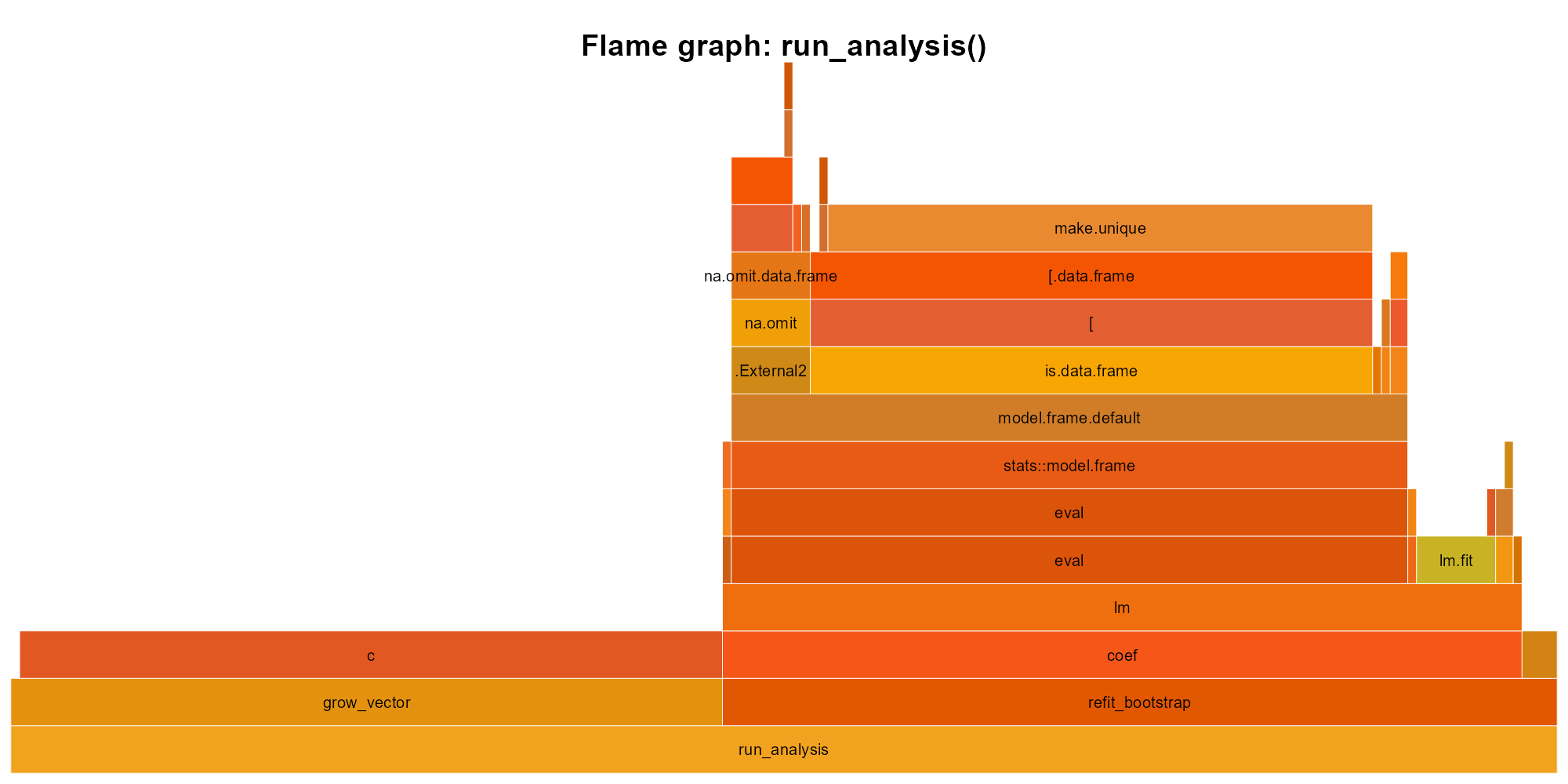
slow_analysis(): width is time. The c() tower on the left (the residual-copying loop) and the lm call stack on the right are the two hot spots. The c() loop takes roughly half the total time.
Read from bottom to top. slow_analysis calls lm on the right and runs the residual-copying loop on the left; inside the loop, nearly all time goes to c(), the vector-growing bottleneck, while inside lm the cost distributes across its internals (model.frame, eval, lm.fit). Without this graph, you might guess model fitting is the problem. The graph says otherwise.
The workflow is simple: run profvis on realistic input, find the hot spot, fix that one thing, re-profile. What do you do once you have found the bottleneck?
TipOpinion
If you have not profiled, you do not have a performance problem. You have a feeling.
Exercises
- Use
system.time()to comparesort(x)andx[order(x)]forx <- rnorm(1e6). - Use
bench::mark()to comparesum(x)andReduce("+", x)forx <- rnorm(1e4). Which is faster, and by how much?
28.2 Vectorization
Consider a vector of a hundred thousand numbers. You want to double each one. You could write a loop that visits each element, multiplies it by two, and stores the result, or you could write x * 2 and let R handle the iteration:
x <- rnorm(1e5)

# Vectorized: fast
system.time(y <- x * 2)
#>    user  system elapsed
#>       0       0       0

# Loop: slow
system.time({
  y <- numeric(length(x))
  for (i in seq_along(x)) y[i] <- x[i] * 2
})
#>    user  system elapsed
#>       0       0       0
On this machine the loop takes about fifty times longer. Both versions visit every element; the difference is where the loop runs. x * 2 dispatches to a C routine that walks the block of doubles in compiled code, while the for loop steps through R’s interpreter once per element, paying for a variable lookup, an index computation, and an assignment each time. The gap widens with input size, and part of it is the hardware’s doing: the doubles sit next to each other in memory, so the CPU’s prefetcher loads the next cache line before the loop asks for it (Section 29.4 shows the layout).
NoteWhere vectorization comes from
In 1962 a mathematician at IBM published a book describing a notation in which operations apply to whole arrays: to add two vectors you write A + B, and the notation says nothing about how many elements there are or in what order they are visited. The notation became the language APL, its author, Kenneth Iverson, received the Turing Award for it in 1979, and his lecture on that occasion, Notation as a Tool of Thought, is still the clearest argument for the idea. S adopted whole-array operations for statisticians who think in columns, and R inherited them (Section 4.4). The second half of the story, the cache-friendly memory layout, has a name too: Martin Thompson, a high-performance computing advocate, borrowed mechanical sympathy from racing driver Jackie Stewart for software that works with the hardware rather than against it.
Three loop shapes come up again and again, and each has a vectorized form. A loop that tests each element and assigns one of two values is ifelse(), or dplyr::case_when() when there are more than two branches:
# Slow
result <- character(length(x))
for (i in seq_along(x)) {
  if (x[i] > 0) result[i] <- "pos" else result[i] <- "neg"
}

# Fast
result <- ifelse(x > 0, "pos", "neg")
A loop that carries a running total is cumsum(); cumprod() and cummax() cover the running product and running maximum:
# Slow
result <- numeric(length(x))
result[1] <- x[1]
for (i in 2:length(x)) result[i] <- result[i-1] + x[i]

# Fast
result <- cumsum(x)
A loop over the rows or columns of a matrix is usually rowSums(), colMeans(), or a matrix operation:
# Slow
row_totals <- numeric(nrow(mat))
for (i in 1:nrow(mat)) row_totals[i] <- sum(mat[i, ])

# Fast
row_totals <- rowSums(mat)
Not everything yields to vectorization. Iterations where each step depends on the previous result (Markov chains, recursive algorithms, some simulations) genuinely need loops, and for those Section 28.6 offers an escape hatch. But before reaching for compiled code, make sure you are not confusing convenience wrappers with the real thing.
sapply() and lapply() look like vectorization, but they are wrappers around a loop that still calls your R function once per element, no faster than a well-written for loop. True vectorization means the loop runs in C: sum(), cumsum(), ifelse(), pmin(), rowSums(). If the loop is still in R, the speed is still in R.
The distinction goes back to S (Section 2.3), which assumed that heavy computation would happen in compiled Fortran or C routines and that the language would orchestrate them. sum() and rowSums() are those routines, exposed directly: one trip into C walks the memory block and returns. sapply(x, f) never leaves the interpreter. It calls your R function once per element, paying for argument matching, a new environment, and promise creation on every iteration.
So what happens when you have a loop that genuinely cannot be vectorized, but it still needs to be fast?
Exercises
- Write a loop that computes the absolute value of each element in a vector. Then write the vectorized version using
abs(). Benchmark both withbench::mark(). - Replace this loop with a single vectorized expression:
for (i in 1:length(x)) if (x[i] < 0) x[i] <- 0. (Hint:pmax().)
28.3 Memory: pre-allocate and avoid copies
A loop might be slow not because loops are inherently slow in R, but because R is copying your entire result vector on every iteration.
# Slow: O(n^2) because each c() copies the entire vector
slow_squares <- function(n) {
  result <- c()
  for (i in 1:n) result <- c(result, i^2)
  result
}

# Fast: O(n) with pre-allocation
fast_squares <- function(n) {
  result <- numeric(n)
  for (i in 1:n) result[i] <- i^2
  result
}

# Fastest: vectorized
vec_squares <- function(n) (1:n)^2bench::mark(
growing = slow_squares(1000),
prealloc = fast_squares(1000),
vector = vec_squares(1000),
check = FALSE
)
#> # A tibble: 3 × 6
#> expression min median `itr/sec` mem_alloc `gc/sec`
#> <bch:expr> <bch:tm> <bch:tm> <dbl> <bch:byt> <dbl>
#> 1 growing 401µs 448.2µs 2126. 3.88MB 174.
#> 2 prealloc 14.8µs 17.2µs 57441. 25.78KB 5.74
#> 3 vector 900ns 1.1µs 750915. 11.81KB 225.Each call to c(result, value) allocates a new vector of size length(result) + 1 and copies every existing element into it. For n iterations, that totals \(1 + 2 + 3 + \cdots + n = O(n^2)\) copies, which means doubling your input size quadruples your runtime. Pre-allocation sidesteps the entire problem: you tell R the final size upfront with numeric(n), character(n), logical(n), or vector("list", n), and each assignment writes directly into the slot without copying anything.
But pre-allocation only solves the allocation problem. There is a second trap in how R shares memory, the copy-on-modify rule from Section 9.4: R copies an object when you modify it and another name points to it.
x <- 1:1e6
y <- x        # y and x share the same memory
y[1] <- 0L    # now R copies, because modifying y would change x
You can track copies with tracemem():
x <- 1:5
tracemem(x)
#> [1] "<00000244FEC62578>"
y <- x
y[1] <- 0L    # triggers a copy
#> tracemem[0x00000244fec62578 -> 0x0000024503a6ba58]: eval eval withVisible withCallingHandlers eval eval with_handlers doWithOneRestart withOneRestart withRestartList doWithOneRestart withOneRestart withRestartList withRestarts <Anonymous> evaluate in_dir in_input_dir eng_r block_exec call_block process_group withCallingHandlers with_options <Anonymous> process_file <Anonymous> <Anonymous> execute .main
untracemem(x)
When only one name references an object, R modifies it in place, which is why pre-allocated loops are fast: the result vector has a single reference, so result[i] <- value writes directly without triggering a copy. The subtlety is that functions create references too. When you pass x to a function, the function parameter and the caller’s variable both point to the same object; if the function modifies its copy, R silently allocates a new one. This means helper functions called inside tight loops can trigger copies you never intended. tracemem() is your diagnostic tool here.
Exercises
- Write a function that grows a character vector by appending one element at a time in a loop. Time it for
n = 10000. Then rewrite with pre-allocation. What is the speedup? - Use
tracemem()to observe when R copies a vector. Createx <- 1:5, theny <- x, then modifyy[1] <- 99L. How many copies happen?
28.4 data.table
You have vectorized your operations, pre-allocated your loops, and the code is still too slow. The bottleneck is the data frame engine itself. dplyr is readable and expressive, but on millions of rows its abstractions carry a cost: intermediate copies, grouped operations that could be fused, filters that scan more data than necessary.
data.table strips away those abstractions:
library(data.table)

dt <- fread("large_file.csv")  # much faster than read.csv()

# Filter, compute, group in one expression
dt[age > 30, .(mean_income = mean(income)), by = region]
The dt[i, j, by] syntax puts row filtering (i), column operations (j), and grouping (by) in a single expression, which lets data.table optimize the entire operation as a single pass. It modifies columns in place, avoiding the copy-on-modify overhead. It runs several of its internal operations on multiple threads, uses less memory than equivalent dplyr pipelines, and its fread() reads CSV files much faster than read.csv() and often faster than readr::read_csv().
The trade-off is a steeper learning curve; the dt[i, j, by] idiom reads differently from dplyr pipes. If you do not want to learn the syntax, dtplyr bridges the gap: write dplyr verbs, get data.table speed. It translates your pipeline behind the scenes.
A quick comparison:
# dplyr
library(dplyr)
sales |>
  filter(year == 2024) |>
  group_by(region) |>
  summarise(total = sum(revenue))

# data.table
library(data.table)
dt <- as.data.table(sales)
dt[year == 2024, .(total = sum(revenue)), by = region]
On small data, the difference is negligible. On millions of rows with many groups, the gap opens up:
n <- 5e6
sales <- data.frame(
  region = sample(letters, n, replace = TRUE),
  revenue = rnorm(n, 1000, 200)
)
dt <- data.table::as.data.table(sales)

bench::mark(
  dplyr = sales |>
    dplyr::group_by(region) |>
    dplyr::summarise(total = sum(revenue)),
  data.table = dt[, .(total = sum(revenue)), by = region],
  check = FALSE
)
On this machine (data.table 1.18.4 on 16 threads, dplyr 1.2.1) the medians were 60 ms and 159 ms: data.table about 2.7 times faster on five million rows and 26 groups. The gap widens with more groups. Reach for data.table when your data has millions of rows, when you are grouping over many categories, or when the same pipeline runs repeatedly in a loop or a Shiny app. If your data fits comfortably in memory and dplyr finishes in seconds, switching buys you nothing but a syntax change. Both dplyr and data.table operate entirely in memory, loading the whole dataset into RAM before touching a single row.
Exercises
- Install
data.tableand convertmtcarsto a data.table withas.data.table(). Compute the meanmpggrouped bycylusing thedt[i, j, by]syntax. Verify your result matchesmtcars |> group_by(cyl) |> summarise(mean(mpg)). - Use
fread()to read a CSV file (any file you have, or write one withfwrite(mtcars, "test.csv")first). Compare its speed againstread.csv()usingbench::mark().
28.5 Columnar engines: Arrow and DuckDB
What happens when your data no longer fits in memory, or when it does fit but you want analytics that finish before your coffee cools?
You have probably already hit the wall. A grouped summarise() on 50 million rows takes minutes and turns your laptop fan into a jet engine. read.csv() on a 10 GB file eats all available RAM and crashes the session without producing a single result. The data is not even big by industry standards; R just was not designed to hold it all at once and churn through it.
The arrow package reads Parquet and Feather files and processes them with dplyr syntax. Operations are lazy: they build a query plan, then execute it in a single pass, loading only the columns and rows you actually need:
library(arrow)

open_dataset("data/large_parquet/") |>
  dplyr::filter(year == 2024) |>
  dplyr::group_by(region) |>
  dplyr::summarise(total = sum(revenue)) |>
  dplyr::collect()  # only now does data enter R
DuckDB (the duckdb package) is an embedded analytical database that reads Parquet, CSV, and data frames, handles data larger than RAM, and supports both SQL and dplyr syntax (via dbplyr):
library(duckdb)
con <- dbConnect(duckdb())
duckdb_register(con, "sales", sales_df)

dbGetQuery(con, "SELECT region, SUM(revenue) FROM sales GROUP BY region")
dbDisconnect(con)
duckplyr removes the SQL: it is a drop-in replacement for dplyr that routes computation through DuckDB’s engine. In June 2025 duckplyr formally joined the tidyverse. Existing dplyr code runs unchanged; duckplyr intercepts the verbs, routes what it can through DuckDB, and falls back to dplyr for anything DuckDB does not support.
The stack looks like this: Parquet files on disk, Arrow or DuckDB as the engine, dplyr verbs as the interface, results collected into R. Much of the speed comes from query fusion, combining several operations into a single pass over the data and eliminating the intermediate allocations.
NoteDeforestation
Functional programming has had a name for query fusion since 1988, when Philip Wadler called it deforestation: map f . map g builds an intermediate list (a tree, in the general case), and rewriting it as map (f . g) traverses the data once without ever growing that tree. data.table, Arrow, and DuckDB apply the same rewrite to tables.
The dplyr verbs from Chapter 14 were designed as a functional interface: data frame in, data frame out, no mutation of the input. data.table, Arrow, DuckDB, and Polars are different engines, written in C, C++, and Rust, with different memory layouts and optimization strategies, and the same filter(), mutate(), and summarise() run on a local data frame, on a Parquet file through Arrow, and on a DuckDB table through duckplyr. The engines keep changing underneath an interface that has not.
TipOpinion
If your data fits in memory and dplyr is fast enough, stop. If it does not fit, or if grouped aggregations drag, try DuckDB. With duckplyr the transition cost is nearly zero.
Exercises
- Install
duckdbandDBI. Create an in-memory DuckDB connection, registermtcarsas a table, and run a SQL query to compute meanmpggrouped bycyl. Compare the result with your data.table answer from the previous section. - If you have a Parquet file (or create one with
arrow::write_parquet(mtcars, "test.parquet")), open it witharrow::open_dataset(), filter, andcollect(). Verify the result matches the equivalent dplyr operation on the in-memory data frame.
28.6 When and how to call compiled code
Sometimes R is simply the wrong language for the inner loop. You have profiled, vectorized, pre-allocated, tried data.table, and the bottleneck is a tight loop where each iteration depends on the last, where no vectorized function exists, where the work is purely computational and measured in millions of iterations. At that point the right move is to write that loop in a compiled language and call it from R. The most common route is C++ through Rcpp, which handles type conversion and memory management so that the code looks almost like ordinary C++:
// sum_cpp.cpp
#include <Rcpp.h>
using namespace Rcpp;

// [[Rcpp::export]]
double sum_cpp(NumericVector x) {
    double total = 0;
    for (int i = 0; i < x.size(); i++) {
        total += x[i];
    }
    return total;
}
Rcpp::sourceCpp("sum_cpp.cpp") compiles and loads the function in one step. Two other routes exist: C through R’s own .Call() interface, which base R and many older packages use and which gives you full control at the cost of managing memory yourself, and Rust through extendr, whose compiler rejects the memory errors that C and C++ let through. Chapter 31 walks through all three with complete examples.
Compiled code pays off for loops where each iteration depends on the previous one, for recursive algorithms such as tree traversal and dynamic programming, for element-by-element work that no vectorized function covers, and for any hot loop the profiler has pointed at. It does not pay off when vectorization solves the problem, when the bottleneck is I/O (more C++ will not make your disk spin faster), or when the compiled version would be complex enough to harbor bugs the R version does not have.
TipOpinion
The three routes sit at different points on a trade-off. Rcpp gives you the deepest ecosystem and the smoothest on-ramp, but nothing stops you from writing a buffer overrun that corrupts memory and crashes R ten minutes later. Rust catches those errors at compile time, but its R integration is younger and the community smaller, so you will find fewer examples and hit more rough edges. Raw C gives you total control and zero dependencies at the cost of managing every allocation yourself.
Start with Rcpp. Consider Rust if you want compile-time safety guarantees. Consider raw C only if you need zero dependencies.
28.7 The optimization checklist
When code is too slow, work through this list in order:
- Profile: find the bottleneck. Do not guess.
- Vectorize: replace element-wise loops with vectorized operations.
- Pre-allocate: if you must loop, pre-allocate the result.
- Algorithm: sometimes the problem is \(O(n^2)\) and the fix is \(O(n \log n)\). Better algorithms beat faster languages.
- data.table or DuckDB: for large data, switch the engine.
- Compiled code (Rcpp, extendr,
.Call()): for tight loops that cannot be vectorized. - Parallelize:
future.apply,furrr,parallel. Adds concurrency complexity; worth it when the bottleneck is embarrassingly parallel.
Profiling comes first because of a ceiling that Gene Amdahl worked out in 1967 for parallel machines. If 5% of your code takes 95% of the time, making the other 95% infinitely fast gains you 5%. The same limit applies to parallelization: if 10% of the work is sequential, no number of cores gets you past a 10x speedup. This is Amdahl’s law, and it is why you need to know which 5% to fix before choosing how to fix it.
R has several frameworks for parallel execution; future.apply is the one to reach for. future.apply::future_lapply() works everywhere and swaps in for lapply() with minimal changes. It carries the usual caveat: parallelization only helps when the work is CPU-bound and divisible. If the bottleneck is reading from disk, more cores will not help. If iterations depend on each other, you cannot split them. And the overhead of spawning workers and collecting results means parallelization only pays off when each unit of work is substantial (milliseconds, not microseconds).
library(future.apply)
plan(multisession, workers = 4)

# Parallel version of sapply
results <- future_sapply(1:100, function(i) {
  # some expensive computation
  Sys.sleep(0.1)
  i^2
})
So here is where you stand: you can find bottlenecks, eliminate unnecessary copies, hand tight loops to compiled code, and split independent work across cores. But the optimization that matters most is still the one at the top of the list. Measure first, because the profiler catches what intuition misses.