f <- function() {
  n <- 0
  n <- n + 1
  n
}

f()
#> [1] 1
f()
#> [1] 1
f()
#> [1] 118 Closures and scope
Call this function three times and watch what happens:
Always 1. The counter never advances, because every call starts from scratch: every local variable is born and dies within a single invocation. You could call it a thousand times and nothing would accumulate. So how do you build a function that remembers? The answer runs through environments.
18.1 Environments
Type two assignments at the console and ask R what it has:
x <- 42
y <- "hello"
ls()
#> [1] "f" "x" "y"environment()
#> <environment: R_GlobalEnv>ls() lists the names you have bound, and environment() tells you where. That place is an environment: a mapping from names to values. Every environment has a parent, and the parents form a chain: when R meets a name, it checks the current environment first and then walks up the chain until it finds a binding or reaches the empty environment at the top. parent.env() returns the parent of any environment you hand it.
18.1.1 The global environment
The global environment (.GlobalEnv, or equivalently globalenv()) is where your interactive work lives. Every time you type x <- 42 at the console, you create a binding here, at the bottom of the search path. It is also the default enclosing environment for any function you define interactively, and that default status has consequences.
identical(environment(), globalenv())
#> [1] TRUE
Three properties make it special. It never gets garbage-collected; it persists for the entire R session. Its parent is not fixed: it shifts whenever you attach a new package with library(). And it is the only environment you routinely modify by hand, because functions create and destroy their own execution environments automatically (Section 18.3), while the global environment simply accumulates bindings as you work.
That accumulation lets you explore interactively, building data objects step by step. It also means any function defined in the global environment can see and silently depend on those objects. A function that works in your current session may break in a fresh one because it relied on a global variable you forgot to pass as an argument.
Pass every dependency as an argument and the function becomes portable. But what happens when a name isn’t passed as an argument?
18.1.2 The search path
When you type x at the console, R checks the global environment first; if no match turns up, it moves to the parent, then the parent’s parent, until it either finds the name or runs out of environments. search() prints that chain:
search()
#> [1] ".GlobalEnv"        "package:stats"     "package:graphics"
#> [4] "package:grDevices" "package:utils"     "package:datasets"
#> [7] "package:methods"   "Autoloads"         "package:base"
This is the search path. The global environment sits at the bottom, attached packages stack above it, and package:base lives near the top. That is why you can call mean() without writing base::mean(): R walks the chain, finds mean in the base package, and uses it. But the search path only governs lookups that start from the global environment. What governs lookups inside a function?
Exercises
- Run
ls()in a fresh R session. What do you see? Now assigna <- 1and runls()again. - Run
search()and count how many environments are in the chain. Load a package withlibrary(tools)and runsearch()again. Where did the new package appear? - What does
parent.env(globalenv())return? What aboutparent.env(baseenv())?
18.2 Lexical scoping
Consider this:
x <- 10
f <- function() x
g <- function() { x <- 20; f() }
g()
#> [1] 10
The result is 10, not 20. f was defined in the global environment, so it looks for x there, ignoring the x <- 20 inside g where it was merely called.
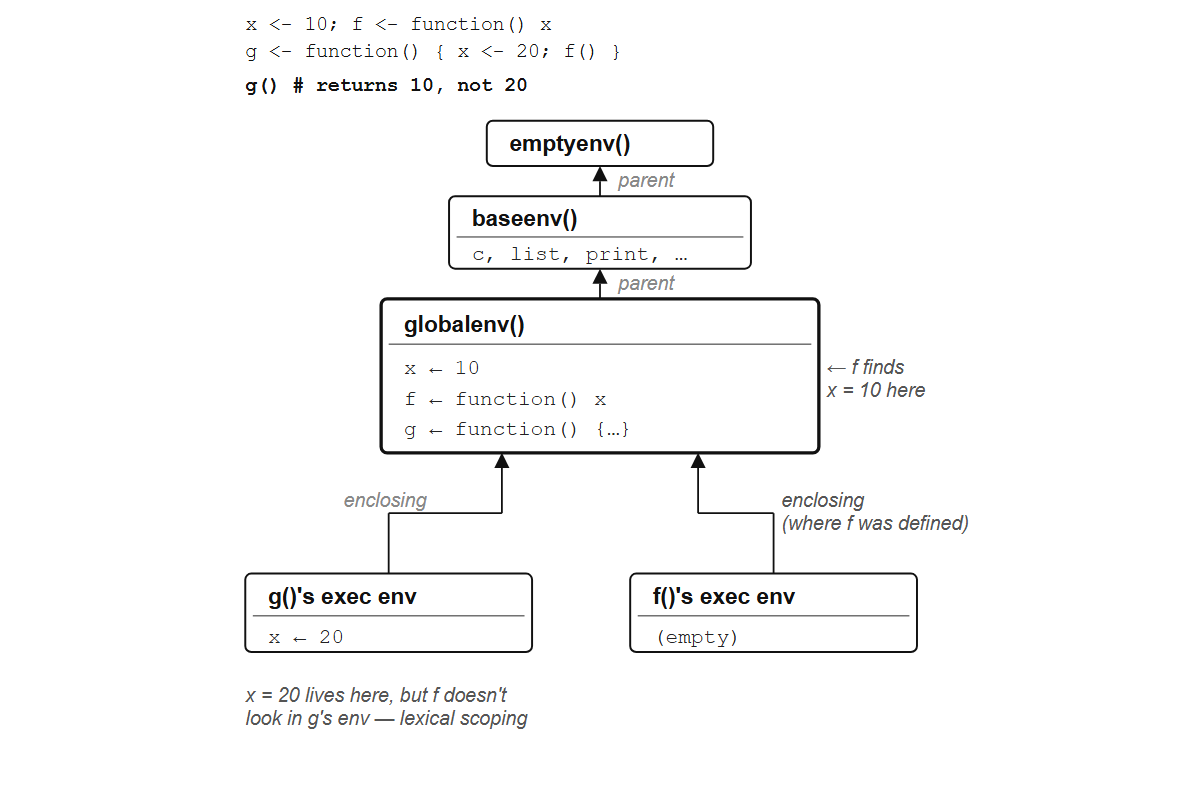
f finds x = 10 in the global environment where it was defined, not x = 20 in g’s execution environment.
This is lexical scoping, the rule R took from Scheme (Section 2.2): a function resolves names where it was defined, not where it was called. The alternative, dynamic scoping, searches the call stack instead, so the same function would return different results depending on who called it. S looked free variables up in the top-level workspace, and R’s choice of the Scheme rule is what makes the rest of this chapter possible.
Lexical scoping settles where R looks. Two more details settle what it finds there. A local name hides the same name further up the chain:
x <- 10
f <- function() {
  x <- 20
  x
}
f()
#> [1] 20
x
#> [1] 10
f returns its own x and the global x is untouched; this is name masking. Lookup also cares whether you are calling a name or reading it: for f(3), R searches for f and skips any binding that is not a function, which is why you can have a variable c <- 10 and still call c(1, 2, 3).
The other thing to know is when R looks. Names are resolved when the function runs, not when it is defined, so if a function uses a variable it does not define, the value can change between calls:
multiplier <- 2
scale <- function(x) x * multiplier
scale(5)
#> [1] 10
multiplier <- 10
scale(5)
#> [1] 50scale never snapshots the value of multiplier at definition time; it reaches into the enclosing environment fresh on every call, which is dynamic lookup. The function adapts automatically if multiplier changes. Occasionally useful. More often, a source of bugs: someone modifies a global variable, and a seemingly unrelated function starts returning different results, with nothing at the call site to explain why.
Exercises
Predict the output before running:
x <- 1
f <- function() {
  x <- 2
  g <- function() x
  g()
}
f()
Predict the output:
x <- 1
f <- function() {
  g <- function() x
  x <- 2
  g()
}
f()
Why is the result different from what you might expect? (Hint: dynamic lookup.)
Can you have a variable named
meanand still call the functionmean()? Try it.
18.3 Execution environments
Every time you call a function, R creates a new environment (the execution environment) with the function’s arguments and local variables as bindings. That is why the counter at the top of this chapter never advances:
f <- function() {
  n <- 0
  n <- n + 1
  n
}

f()
#> [1] 1
f()
#> [1] 1
f()
#> [1] 1
Call it ten times, a hundred times; you always get 1, because each call gets its own execution environment with its own n, and the previous call’s n vanishes the moment that call returns.
The parent of this fresh execution environment is not the environment where the function was called; it is the environment where the function was defined (the enclosing environment). This is what makes scoping lexical: the parent chain is determined by the structure of the source code, not by which function happened to call which at runtime.
x <- "global"

outer <- function() {
  x <- "outer"
  inner <- function() x
  inner()
}

outer()
#> [1] "outer"
inner was defined inside outer, so its enclosing environment is outer’s execution environment, and when inner looks for x, it finds "outer", not "global". But outer’s execution environment is temporary. Normally, local variables live and die with the call: when the function returns, its execution environment gets garbage-collected and everything inside it disappears.
Unless something keeps it alive. What if outer returned inner instead of calling it? What if a function escaped the environment where it was born, carrying a reference that prevented the garbage collector from reclaiming it?
Exercises
Write a function
fresh()that creates a local variablen <- 0, increments it, and returns it. Call it three times and verify you always get 1.Predict the output:
make <- function() {
  a <- 1
  function() a
}
h <- make()
a <- 99
h()
18.4 Closures
Here is a counter that actually counts:
make_counter <- function() {
  n <- 0
  function() {
    n <<- n + 1
    n
  }
}

count <- make_counter()
count()
#> [1] 1
count()
#> [1] 2
count()
#> [1] 3
When you call make_counter(), R creates an execution environment with n <- 0 and defines the inner function there, so that environment becomes the inner function’s enclosing environment. When make_counter returns, its execution environment would normally be garbage-collected, but the returned function still points to it, so it survives. Each later call to count() gets its own fresh execution environment for local work, while the enclosing environment holding n is shared across all of them and lives as long as count does. That is how count remembers.
This is the closure from Section 7.4, where make_adder remembered a constant. The same captured environment can hold state that changes, and the <<- on the fourth line is what changes it.
<<- is the super-assignment operator. Instead of creating a local binding, it searches parent environments for an existing binding named n and modifies it in place. With a plain <-, n <- n + 1 would create a local n in the execution environment, shadowing the captured one, and the counter would always return 1, the same broken non-counter from the top of the chapter.
Two counters are independent, because each call to make_counter() creates a separate execution environment with its own n:
a <- make_counter()
b <- make_counter()
a()
#> [1] 1
a()
#> [1] 2
a()
#> [1] 3
b()
#> [1] 1
a has counted to 3; b has counted to 1. They share no state.
NoteThe lambda calculus connection
In make_adder(5), the returned function \(x) x + n uses n without defining it: n is a free variable, and a term with free variables is an open term. Applying (λn. λx. x + n) to 5 substitutes 5 for n and gives λx. x + 5 (Section 7.4), a closed term in which every name is accounted for. A closure is the runtime version of that substitution: it closes over its free variables by keeping the environment that binds them, which is where the name comes from. R stops one step short of the substitution, though. The closure holds n = 5 in an environment instead of writing it into the body, and <<- can change what the environment holds. Lambda calculus has substitution only; R’s closures have substitution and a mutable cell.
But the mechanism that keeps their environments alive is the same one that can leak state into the global environment when <<- is used carelessly.
Exercises
- Create a counter with
make_counter. Call it five times. Then inspect the capturednwithenvironment(count)$n. - Modify
make_counterto accept a starting value:make_counter <- function(start = 0) { ... }. Verify thatmake_counter(10)starts counting from 11. - Write
make_countdown(n)that counts down fromn. Each call returns the next value. What happens when it reaches 0?
18.5 <<- and mutable state
<<- gives a closure mutable state by searching parent environments for an existing binding and modifying it there. If it finds none in any parent, it creates one in the global environment, and that is almost always a mistake.
exists("oops")
#> [1] FALSE
f <- function() {
  oops <<- "surprise"
}
f()
oops
#> [1] "surprise"
oops was never defined anywhere, so <<- walked all the way up the parent chain, found nothing, and created it in the global environment: a side effect invisible at the call site, exactly the kind of hidden dependency that makes code hard to debug.
TipOpinion
Use <<- inside closures, never in top-level scripts. If you find yourself using <<- to modify a global variable, you are writing a bug you haven’t found yet. The legitimate use case is closures that encapsulate state: counters, caches, accumulators, where the modified variable lives in a private environment invisible to the outside world.
Inside a closure, <<- is safe precisely because the variable it modifies lives in the closure’s private environment, not in the global environment. Nobody outside the closure can see it or change it (unless they deliberately reach into the environment with environment(f)$n, which is an explicit, conscious choice, not an accident).
The safety costs something, though. Once a function uses <<-, each call can depend on every previous call, and a reader must track two things: what the body does, and what the enclosing environment carries over from earlier calls. That is what makes the counter work, since each call to count() updates n and the next call sees the new value. It is also what makes <<- bugs invisible from the call site: the one-character slip from n <<- n + 1 to n <- n + 1 produces no error and no warning, just a counter stuck at 1.
Exercises
- Write a closure
make_accumulator(start)that returns a function. Each call adds its argument to a running total and returns the new total. Test:acc <- make_accumulator(0); acc(5); acc(3); acc(10)should return 5, 8, 18. - What happens if you use
<-instead of<<-inside the closure? Try it with the counter example.
18.6 Closures as portable state
A closure bundles a function with its data: no global variables, no side effects visible from outside. Consider a function that must remember every value it has ever seen, a running mean that updates with each new observation:
make_running_mean <- function() {
  total <- 0
  count <- 0
  function(x) {
    total <<- total + x
    count <<- count + 1
    total / count
  }
}

avg <- make_running_mean()
avg(10)
#> [1] 10
avg(20)
#> [1] 15
avg(6)
#> [1] 12
A factory function creates an environment, returns an inner function that captures it, and <<- lets the inner function modify the captured state. The state lives in a private environment that travels with the function: no outside code can see or tamper with it, and it persists across calls.
The global-variable approach does none of this:
# Don't do this
total <- 0
count <- 0

running_mean <- function(x) {
  total <<- total + x
  count <<- count + 1
  total / count
}
This version pollutes the global environment with total and count, which any other code can read or modify; you cannot have two independent running means; and if you forget to reset them, your next analysis starts with stale state. The closure version has none of these problems, and the same shape carries well beyond counters. Function factories (Chapter 20) build parameterized families of functions, make_adder and make_multiplier and their cousins in ggplot2 themes and statistical tests. A closure can cache expensive results so they are computed only once, which is memoization. A callback in a Shiny application carries its context in a closure instead of in globals. And a list of closures sharing one private environment behaves like an object with methods and private fields:
make_bank_account <- function(balance = 0) {
  list(
    deposit  = function(amount) {
      balance <<- balance + amount
      invisible(balance)
    },
    withdraw = function(amount) {
      balance <<- balance - amount
      invisible(balance)
    },
    check    = function() balance
  )
}

acct <- make_bank_account(100)
acct$deposit(50)
acct$withdraw(30)
acct$check()
#> [1] 120
Three closures share a single environment containing one private variable, balance. From the outside, acct behaves like an object with methods; from the inside, it is functions closing over a shared environment. Scheme programmers have been trading the two readings since the early 1990s: Norman Adams is credited with “objects are a poor man’s closures”, Christian Queinnec’s Lisp in Small Pieces has the reverse, and in 2003 Anton van Straaten folded both into a koan whose student is enlightened only once he accepts both at the same time. R6 objects work this way: each one is an environment, and its methods are closures that reach it through a variable named self.
Exercises
- Build a
make_running_meanclosure. Feed it the values 4, 8, 12. Verify the running mean is 4, 6, 8. - Create two independent running means,
avg1andavg2. Feed different values to each and verify they don’t interfere. - Extend
make_bank_accountwith astatementfunction that returns a character vector of all transactions (deposit or withdrawal). You’ll need ahistoryvariable in the enclosing environment.
18.7 Inspecting environments
Closures are easier to understand when you can look inside them. environment(f) returns the enclosing environment of a function, ls() lists what’s in it, and you can access captured variables directly with $:
count <- make_counter()
count()
#> [1] 1
count()
#> [1] 2

environment(count)
#> <environment: 0x00000247d76c2a18>
ls(environment(count))
#> [1] "n"
environment(count)$n
#> [1] 2
The counter has been called twice, so n is 2. Watch it change:
count()
#> [1] 3
environment(count)$n
#> [1] 3
Now n is 3, incremented by the call.
For a richer view, rlang::env_print() shows the environment’s contents, parent, and memory address:
rlang::env_print(environment(count))These tools are not for production code (reaching into a closure’s environment breaks its encapsulation), but for learning they are the fastest way to see what a closure holds. Make one, inspect its environment, call it, inspect again.
Exercises
- Create a running mean with
make_running_mean. Feed it three values. Then inspectenvironment(avg)$totalandenvironment(avg)$countto verify the internal state. - Create two counters. Inspect their environments and confirm they have different
nvalues after calling them different numbers of times. - What does
environment(mean)return? Why is it different fromenvironment(count)?