library(palmerpenguins)
#>
#> Attaching package: 'palmerpenguins'
#> The following objects are masked from 'package:datasets':
#>
#>     penguins, penguins_raw
library(ggplot2)17 Visualization
Try building a bar chart in base R, then a scatterplot, then a histogram. Each one calls a different function with different arguments, different parameter names, different assumptions about what your data looks like. You learn three APIs instead of one idea. ggplot2 gives you a grammar: a small vocabulary of composable pieces that describes any plot, and you assemble the pieces yourself. Once the grammar clicks, you stop asking “which function draws a heatmap?” and start asking “what mapping, what geometry, what coordinate system?”
This chapter assumes your data is tidy (Chapter 16) and that you can filter and summarise it with dplyr. The data is clean; now you look at it.
17.1 The grammar of graphics
The simplest ggplot2 call needs three things:
ggplot(penguins, aes(x = bill_length_mm, y = body_mass_g)) +
  geom_point()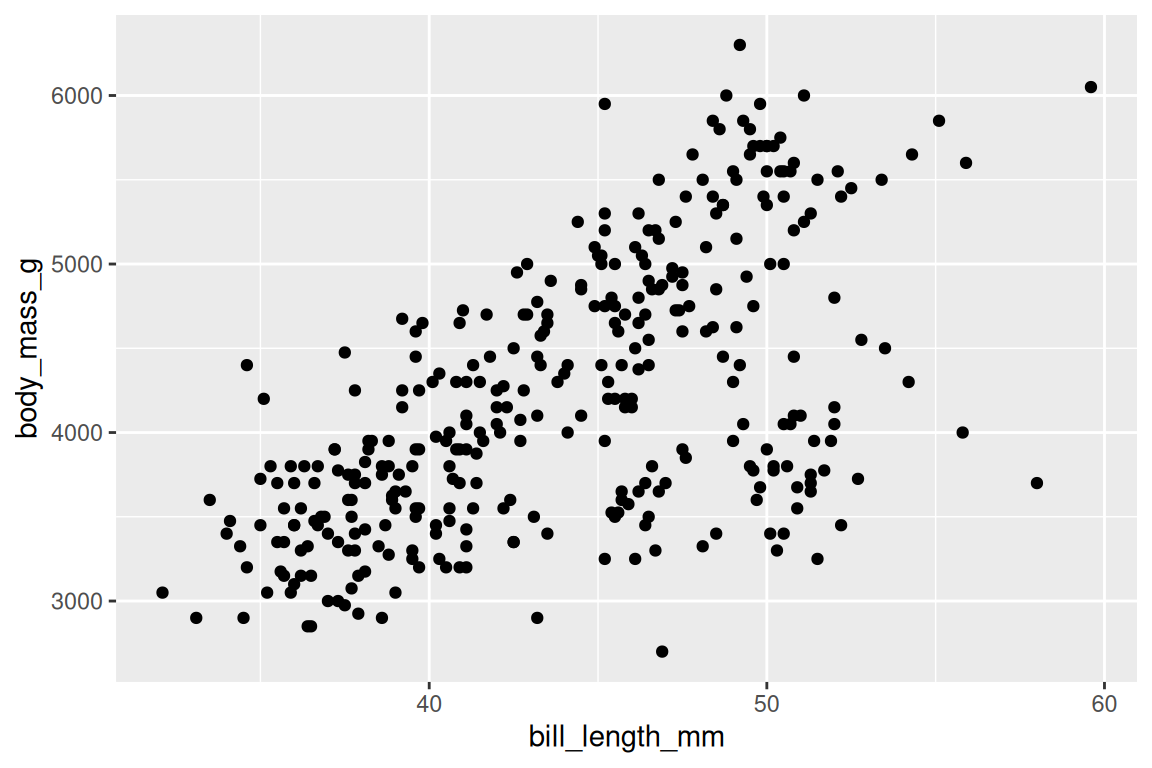
ggplot() takes the data and sets up the coordinate system, aes() maps bill length to the x-axis and body mass to the y-axis, and geom_point() draws one point per row. The + adds the geom as a layer. Those three pieces, the data, an aesthetic mapping and a geom, are enough for most plots. Four more refine them when the defaults fall short: a stat transforms the data before drawing (a histogram counts before it draws bars), scales decide how data values become colors, sizes and axis positions, facets split one plot into panels, and a theme styles everything that is not data. Each gets a section below.
This way of describing a plot comes from a 1999 book, The Grammar of Graphics, in which the statistician Leland Wilkinson argued that a plot is a mapping from data to visual properties, drawn by geometric objects in a coordinate system, and that “bar chart” or “scatterplot” are names for particular choices. Hadley Wickham turned the argument into software in 2005, and ggplot2 is the result: plots built by composing those independent components. But what happens when you want to encode a third variable?
17.2 Aesthetics: data to visuals
aes() creates a mapping from columns to visual properties. Add a third one:
ggplot(penguins, aes(x = bill_length_mm, y = body_mass_g, fill = species, shape = species)) +
  geom_point(stroke = 0.4, size = 2) +
  scale_fill_viridis_d() +
  scale_shape_manual(values = c(21, 22, 24))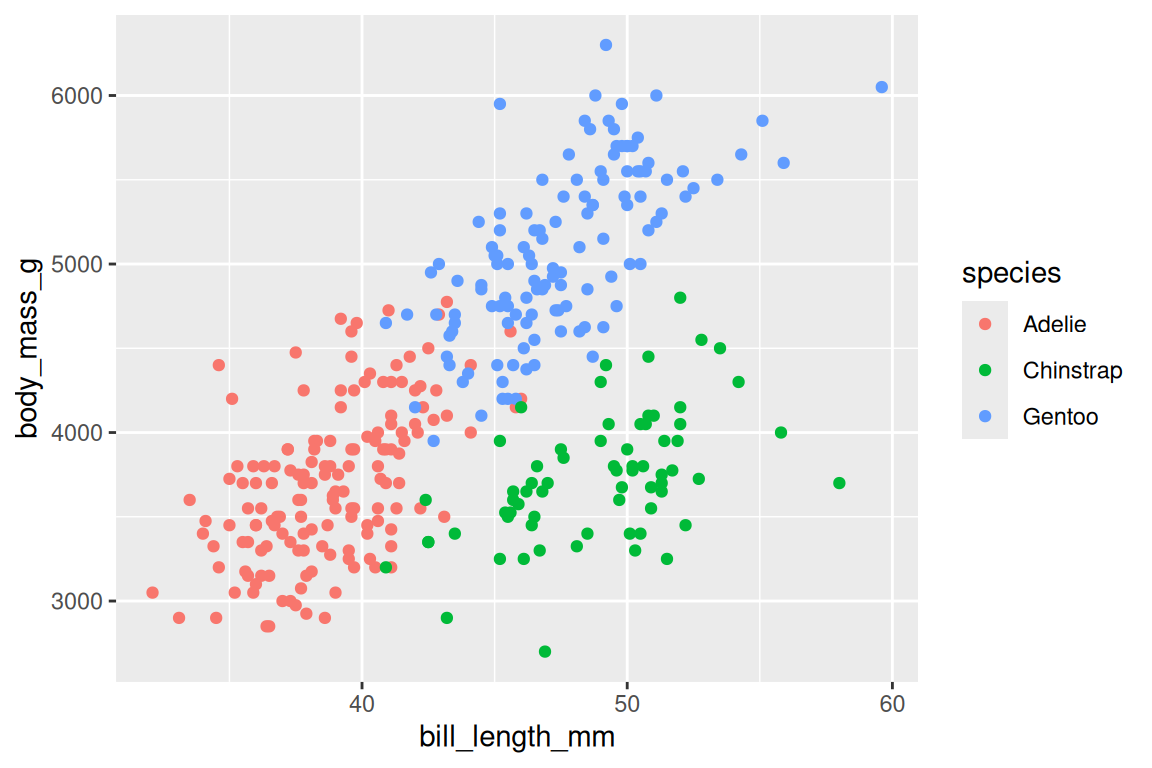
Writing fill = species maps each species to a different fill color, and shape = species to a different point shape; ggplot2 builds the legend for you. The two scale_ lines choose the palette and the point shapes, and scales get their own section (Section 17.4). The mappings you will use most are x, y, and color (or fill); shape, size, alpha, linetype, and group are there when you need them.
NoteBertin’s visual variables
The intellectual roots stretch back to Jacques Bertin’s Semiologie Graphique (1967), which classified visual variables (position, size, shape, value, color, orientation, texture) and ranked their effectiveness for different data types. Wilkinson built on Bertin’s foundation, and when ggplot2 maps a variable to color vs size vs shape, it is implementing Bertin’s taxonomy: position is most effective for quantitative data, color for categorical.
There is one distinction that trips up everyone, usually within the first hour. Compare these two calls:
# Fill varies by species
ggplot(penguins, aes(x = bill_length_mm, y = body_mass_g)) +
  geom_point(aes(fill = species, shape = species), stroke = 0.4, size = 2) +
  scale_fill_viridis_d() +
  scale_shape_manual(values = c(21, 22, 24))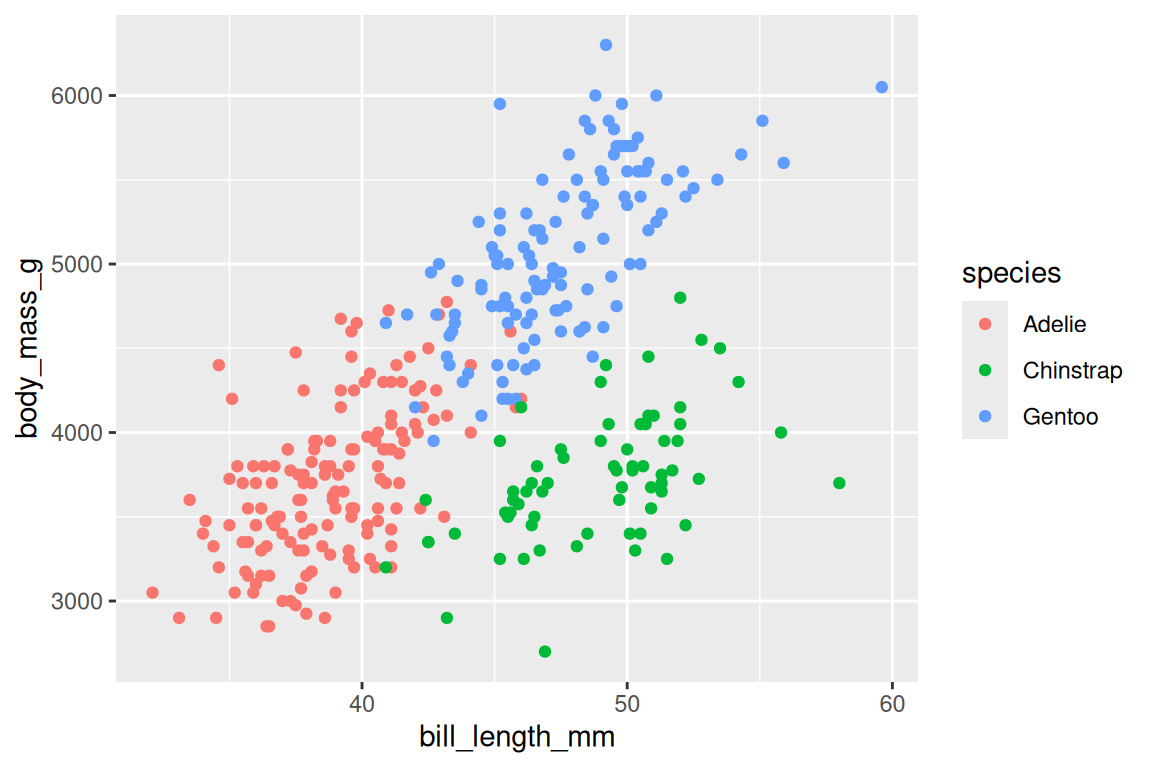
# All points are steel blue
ggplot(penguins, aes(x = bill_length_mm, y = body_mass_g)) +
  geom_point(fill = "steelblue", shape = 21, stroke = 0.4, size = 2)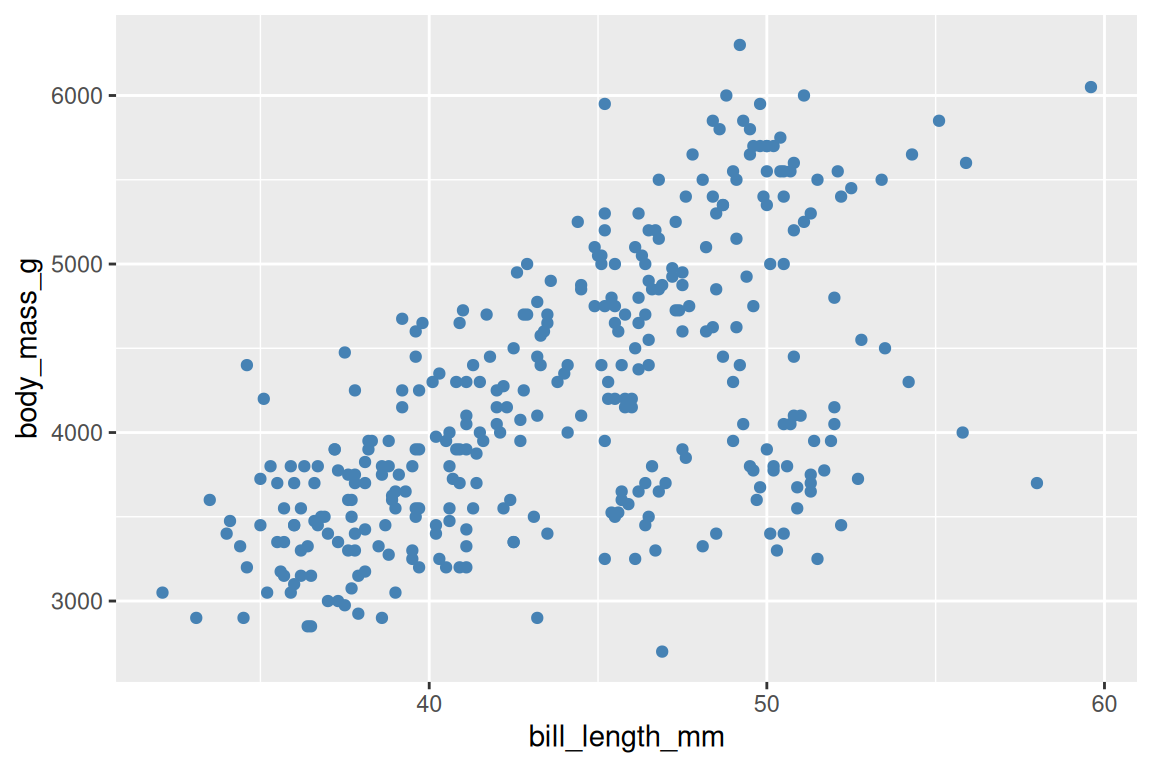
In the first, fill sits inside aes(), so it varies with a column and gets a legend. In the second it sits outside, so it is one fixed value for every point. Inside aes() means mapped to a variable; outside means set for all observations.
TipOpinion
If someone’s plot has a legend they didn’t ask for and every point is the same color, they put a constant inside aes(), and ggplot2 has dutifully mapped a variable with one value. If a column that exists comes back as “object not found”, they put its name outside aes(), where R looks it up in the workspace instead of the data. Getting this one distinction right fixes roughly half of all ggplot2 questions on Stack Overflow.
Aesthetics placed in ggplot() are inherited by every layer; aesthetics placed in a specific geom_*() apply only to that layer. Inheritance saves repeating the mapping in every layer, and it also means a misplaced aesthetic can quietly propagate to layers you didn’t intend. So what shapes can those layers draw?
Exercises
- Create a scatterplot of
flipper_length_mmvsbody_mass_gfrompenguins. Mapspeciesto color. - What happens if you put
color = "blue"insideaes()? Try it and explain the result. - Map
islandto theshapeaesthetic in a scatterplot. What does the legend show?
17.3 Geoms: shapes for data
Each geom draws the same mapped data as a different shape. geom_point() draws a scatterplot, the natural choice for two continuous variables:
ggplot(penguins, aes(x = flipper_length_mm, y = body_mass_g)) +
  geom_point()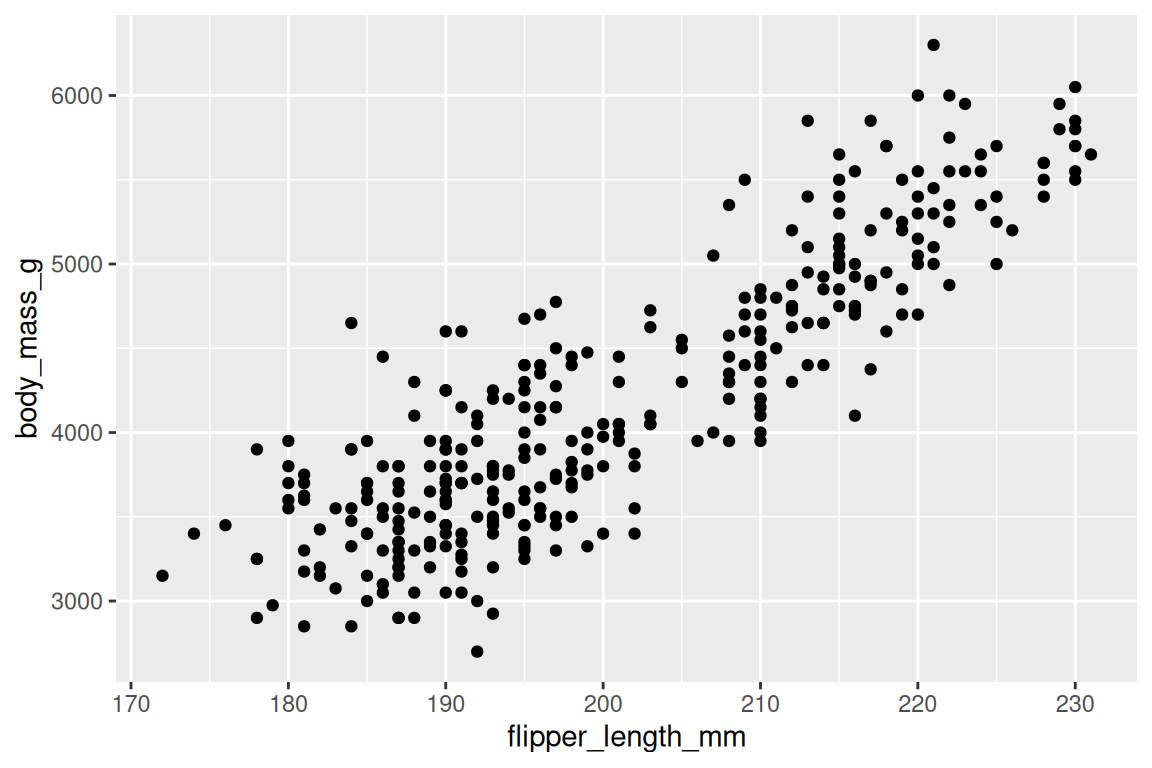
geom_histogram() shows the distribution of one continuous variable, and you control the resolution with bins or binwidth:
ggplot(penguins, aes(x = body_mass_g)) +
  geom_histogram(binwidth = 200, fill = "grey70", color = "white")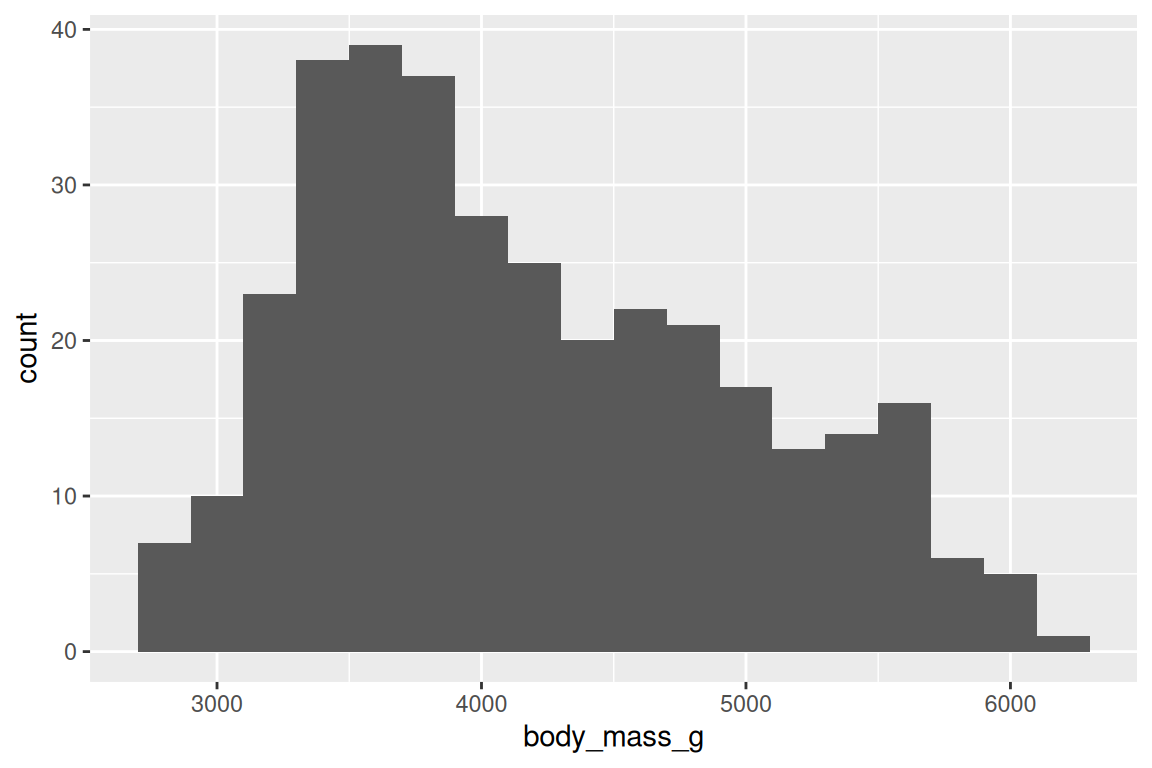
geom_boxplot() summarizes distributions by group (median, quartiles, outliers):
ggplot(penguins, aes(x = species, y = body_mass_g)) +
  geom_boxplot(fill = "grey85", color = "grey30")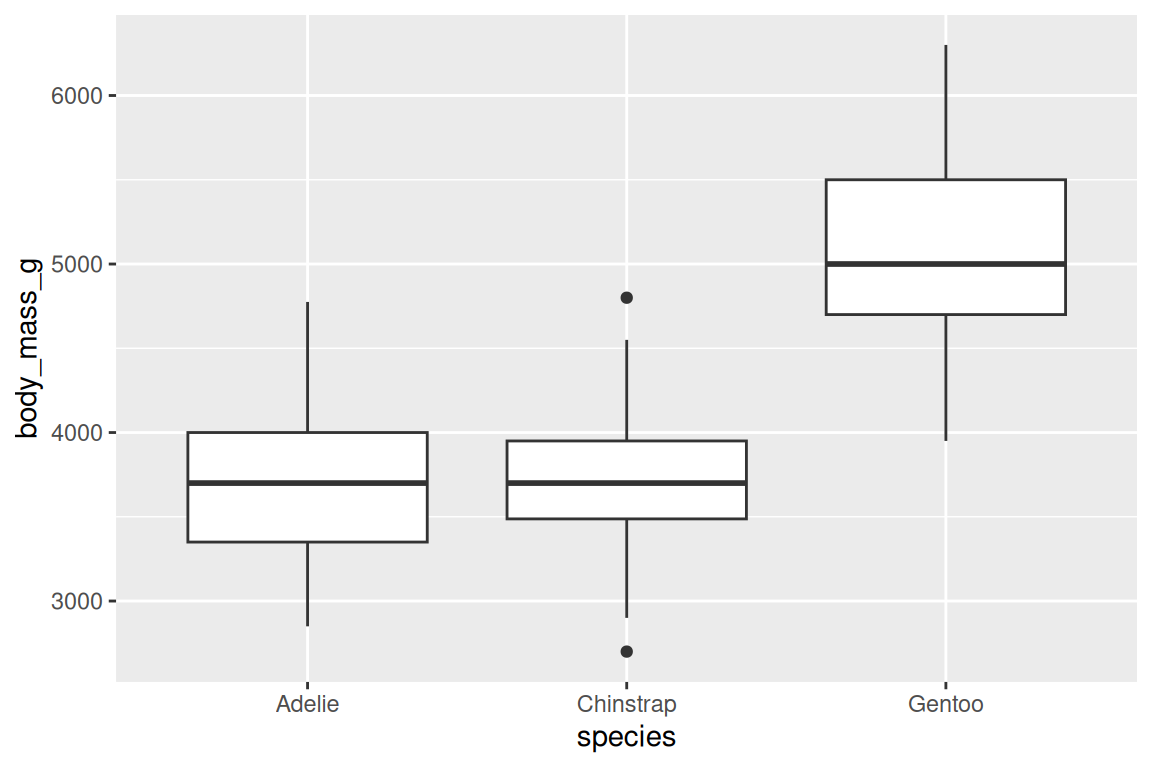
geom_density() is a smooth alternative to the histogram that estimates probability density, making it easier to overlay and compare distributions:
ggplot(penguins, aes(x = body_mass_g, fill = species, linetype = species)) +
  geom_density(alpha = 0.4) +
  scale_fill_viridis_d()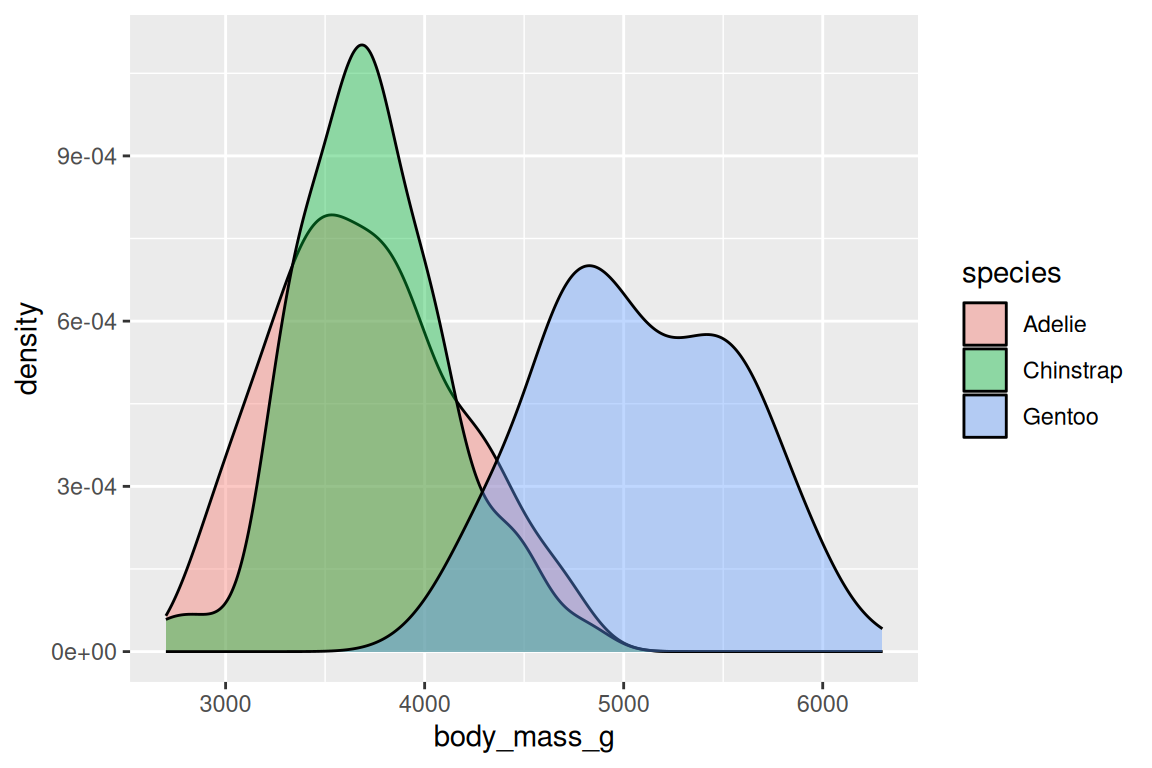
geom_line() connects points from left to right, the standard geom for time series and trends. Order matters: if the data isn’t sorted by x, the lines will zigzag into nonsense.
geom_col() draws bars with heights taken directly from the data, while geom_bar() counts rows for you. The difference is the stat: geom_bar() applies stat = "count" internally, so you only map x; geom_col() uses stat = "identity", so you map both x and y.
ggplot(penguins, aes(x = species)) +
  geom_bar(fill = "grey70", color = "white")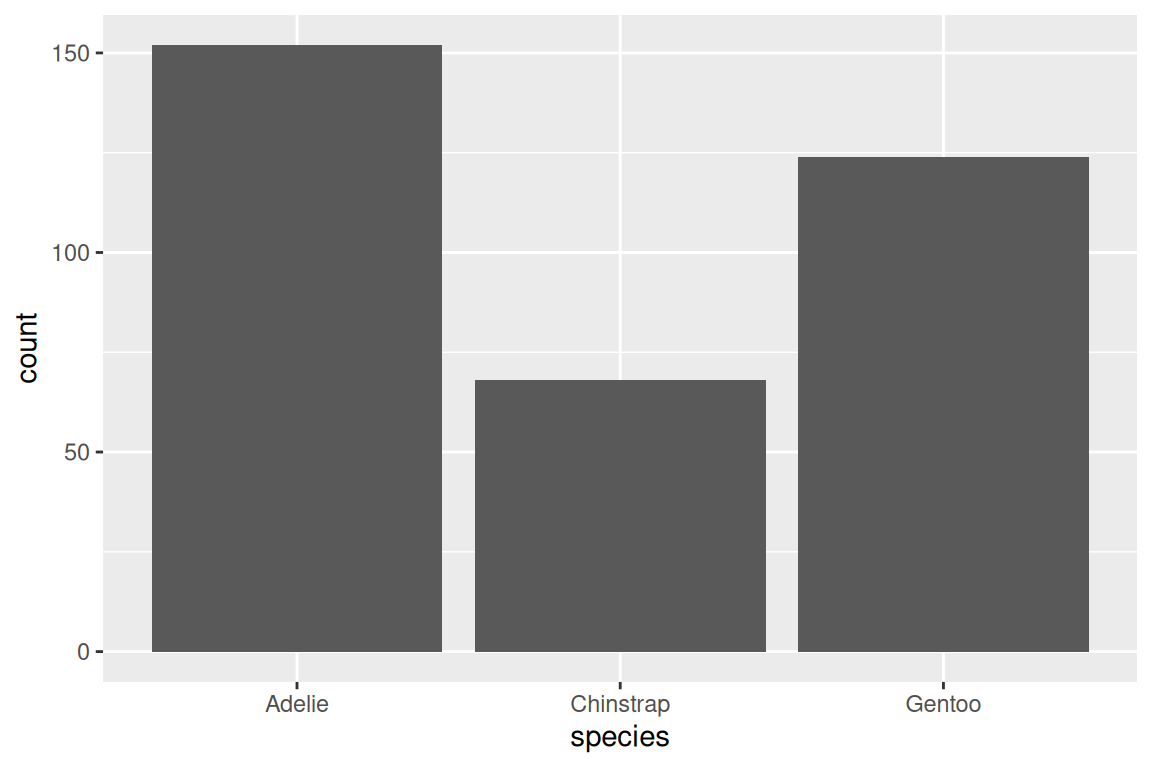
geom_smooth() adds a fitted line or curve, with method = "lm" for linear and method = "loess" for smooth:
ggplot(penguins, aes(x = bill_length_mm, y = body_mass_g)) +
  geom_point() +
  geom_smooth(method = "lm")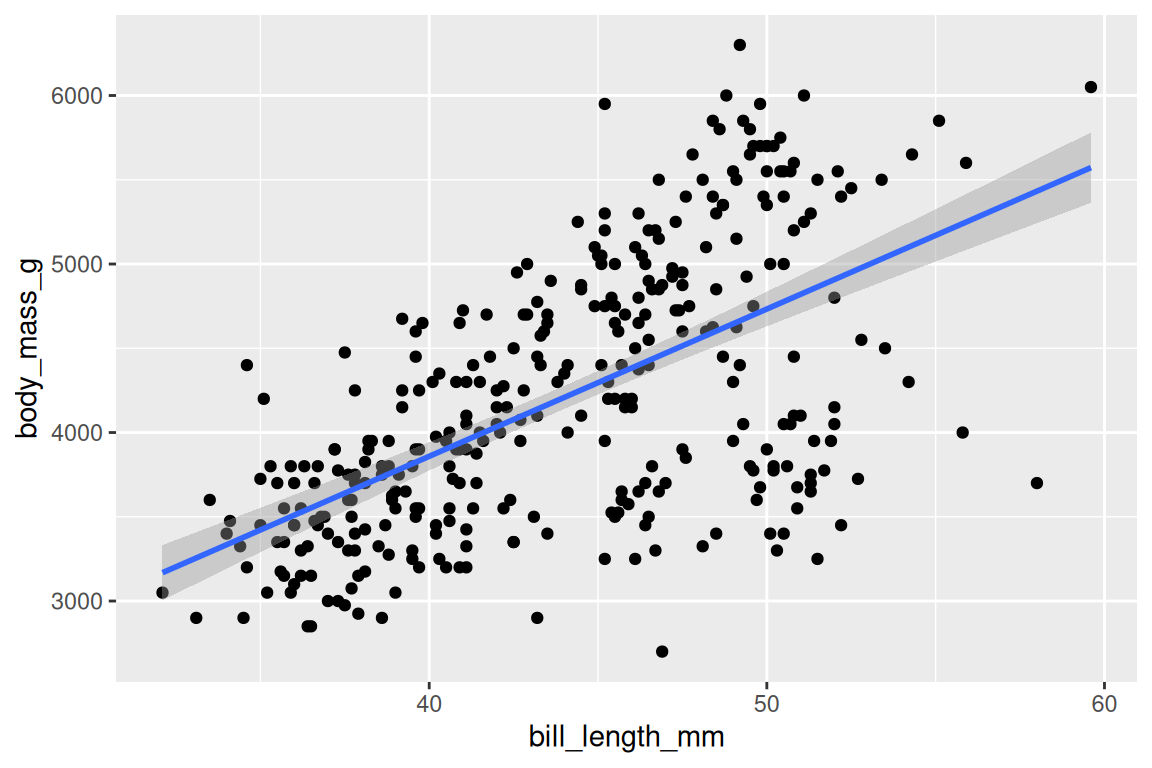
Which geom fits which question:
| Question | Geom | Data shape |
|---|---|---|
| How are two continuous variables related? | geom_point(), geom_smooth() |
x continuous, y continuous |
| How is one variable distributed? | geom_histogram(), geom_density() |
x continuous |
| How do distributions compare across groups? | geom_boxplot(), geom_violin() |
x categorical, y continuous |
| How does a quantity change over time? | geom_line() |
x ordered (time), y continuous |
| How do counts or totals compare across categories? | geom_bar() (counts rows), geom_col() (uses a y value) |
x categorical |
Start from the question, pick the geom, then refine. Layers compose with +: the last plot above has two layers, points and a linear fit, and each + adds a component to the same plot object. But adding layers only changes the geometry. What about controlling how data values map to visual properties?
Exercises
- Create a scatterplot of
bill_length_mmvsbill_depth_mm. Add a smooth line withmethod = "loess". - Replace
geom_point()withgeom_density2d()in the same plot. What changes? - Make a boxplot of
flipper_length_mmbyisland. Addgeom_jitter(width = 0.2, alpha = 0.3)as a second layer.
17.4 Scales: controlling the mapping
Every aesthetic has a scale, whether you set one or not. When you write aes(x = bill_length_mm), ggplot2 creates a default scale_x_continuous() behind the scenes, and you override it only when the default falls short: to change axis limits, transform the axis, or pick specific colors. Position scales control axes:
ggplot(penguins, aes(x = body_mass_g, y = flipper_length_mm)) +
  geom_point() +
  scale_x_continuous(labels = scales::comma)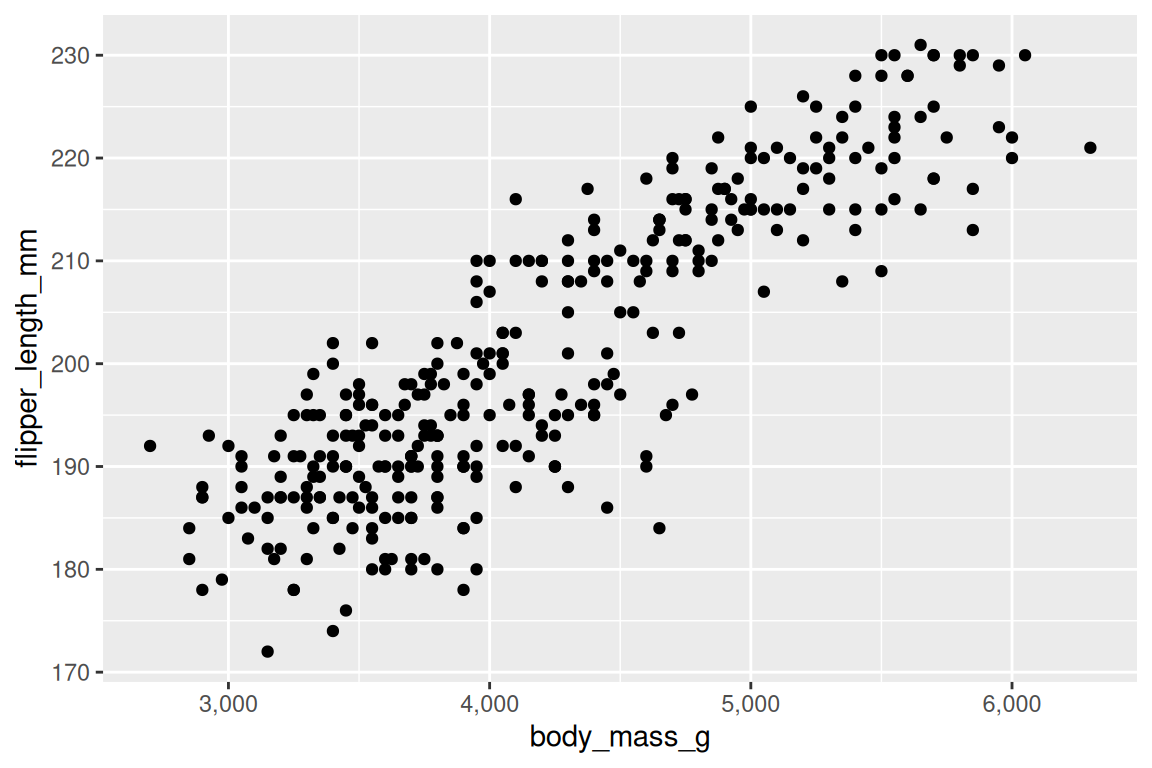
Color scales control how values map to colors. For a discrete variable, scale_fill_viridis_d() (or scale_color_viridis_d() for the color aesthetic) is a strong default: colorblind-friendly and perceptually uniform:
ggplot(penguins, aes(x = bill_length_mm, y = body_mass_g, fill = species, shape = species)) +
  geom_point(stroke = 0.4, size = 2) +
  scale_fill_viridis_d() +
  scale_shape_manual(values = c(21, 22, 24))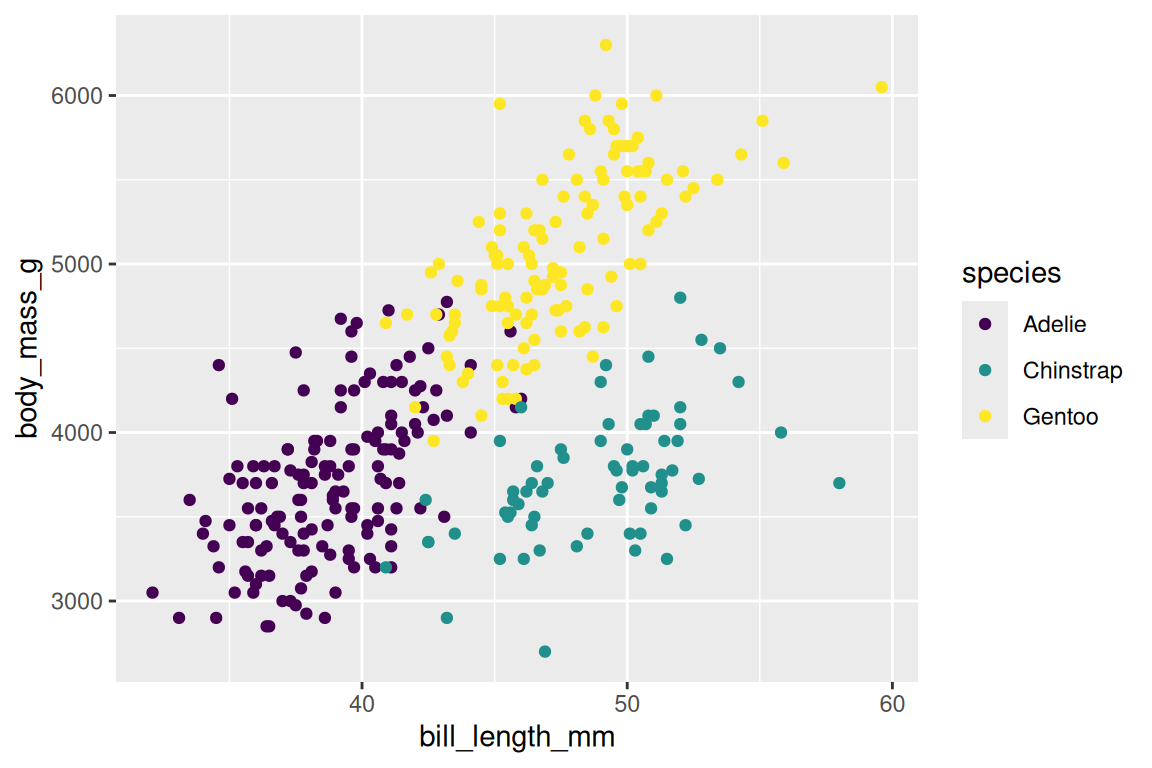
labs() sets titles and axis labels:
ggplot(penguins, aes(x = bill_length_mm, y = body_mass_g, fill = species, shape = species)) +
  geom_point(stroke = 0.4, size = 2) +
  scale_fill_viridis_d() +
  scale_shape_manual(values = c(21, 22, 24)) +
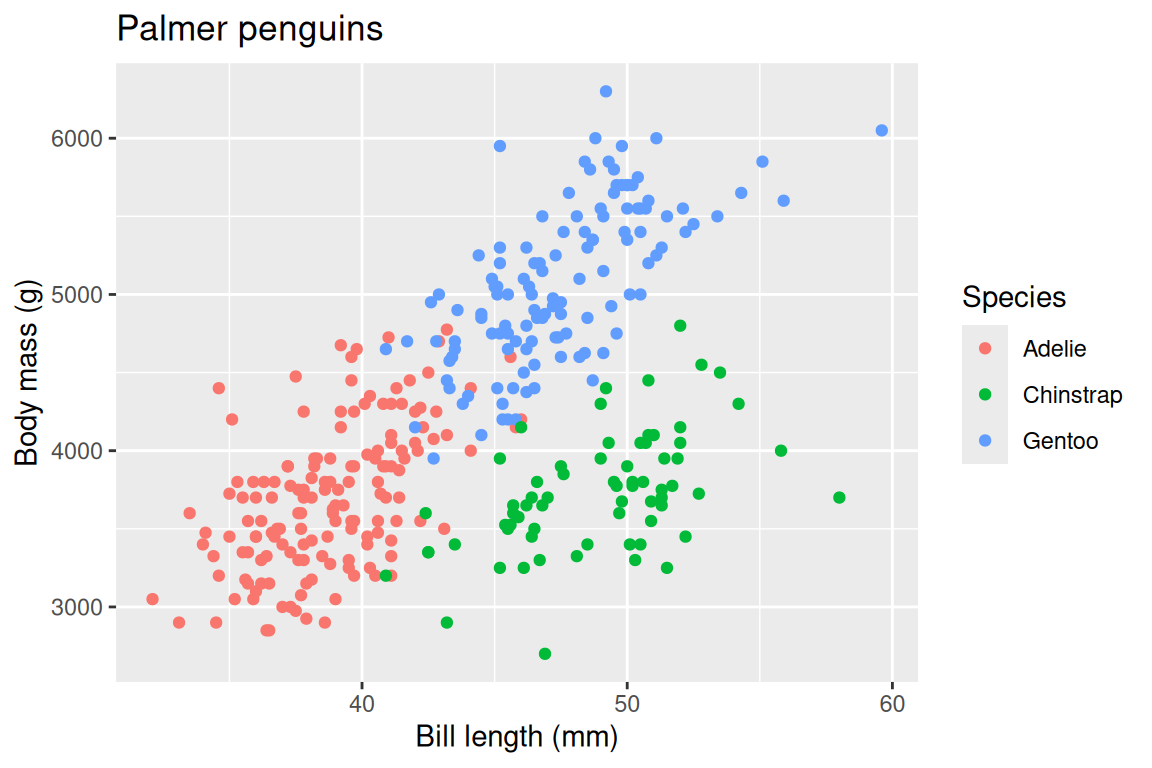
  labs(
    x = "Bill length (mm)",
    y = "Body mass (g)",
    fill = "Species",
    shape = "Species",
    title = "Palmer penguins"
  )
TipOpinion
Always label your axes with units. A plot with bill_length_mm on the axis is a working draft; a plot with “Bill length (mm)” is communication. The difference is thirty seconds of typing and the entirety of your audience’s comprehension.
Exercises
- Create a scatterplot of
bill_length_mmvsbody_mass_g, colored byspecies. Usescale_color_brewer(palette = "Set2")instead of viridis. - Add a
labs()call with a title, subtitle, and proper axis labels. - Use
scale_y_log10()on a plot ofbody_mass_g. When might a log scale be appropriate?
17.5 Facets: small multiples
Faceting splits one plot into multiple panels, one per level of a variable. facet_wrap() wraps panels into rows:
ggplot(penguins, aes(x = bill_length_mm, y = body_mass_g)) +
  geom_point() +
  facet_wrap(~ island)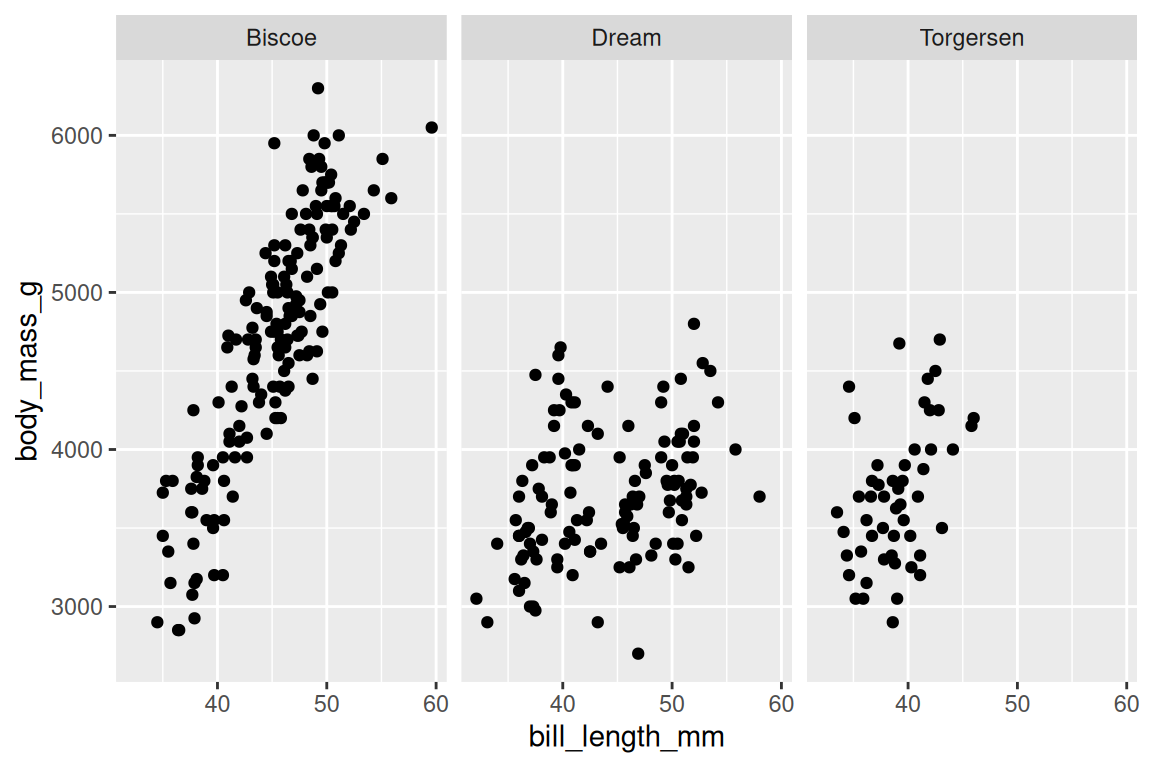
facet_grid() creates a grid with rows and columns:
ggplot(penguins |> dplyr::filter(!is.na(sex)),
       aes(x = bill_length_mm, y = body_mass_g)) +
  geom_point() +
  facet_grid(sex ~ island)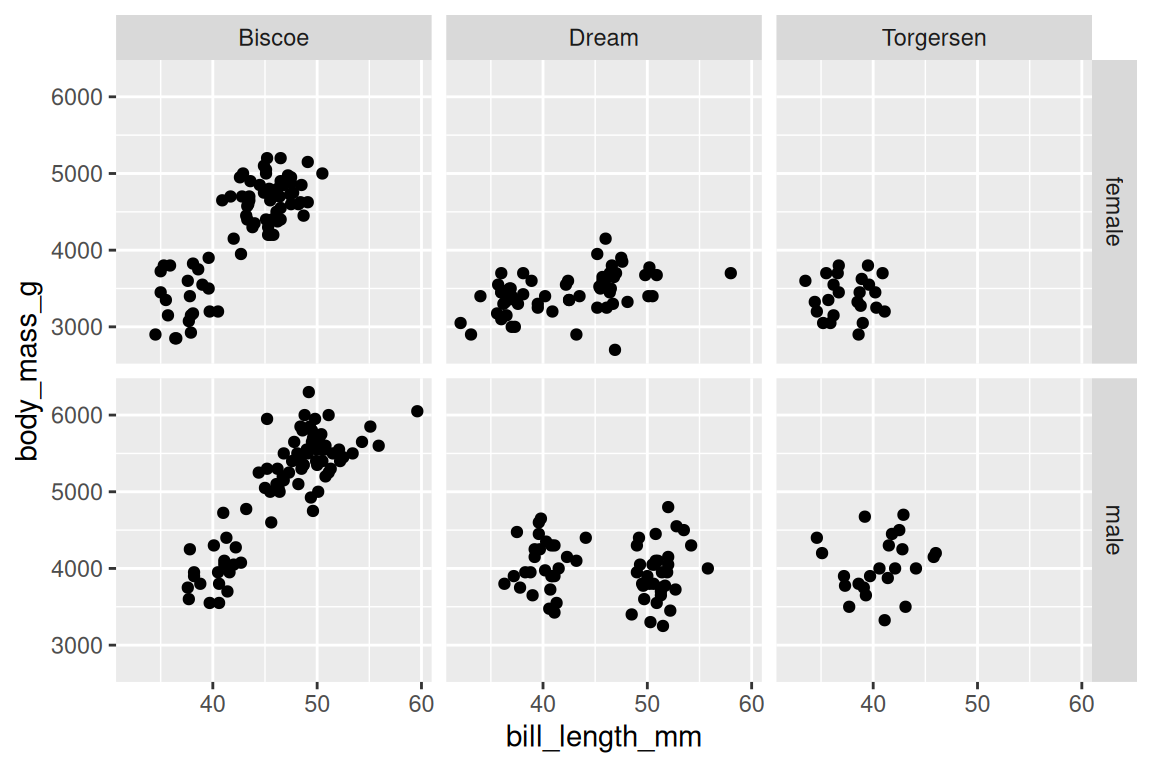
By default, all panels share the same axis scales. You can free them with scales = "free_y" or scales = "free", but use this cautiously: free scales make comparison across panels harder, which is the whole point of small multiples in the first place.
When should you facet instead of coloring? Facet when the groups would overlap too much for color to separate them, or when you want each group’s pattern to stand on its own without visual interference. Color works when groups are few, visually separable, and you want to see them in the same coordinate space.
Either way, one facet_wrap() call produces every panel with shared axes, where a loop or copy-paste would have built the same plot three times. But what about the visual details that have nothing to do with data?
Exercises
- Facet the penguins scatterplot (bill length vs body mass) by
speciesusingfacet_wrap(). - Use
facet_grid(species ~ island)on the same plot. Which cells are empty, and why? - Add
scales = "free"to your faceted plot. What changes? Is the comparison easier or harder?
17.6 Themes: non-data styling
Themes control everything on a plot that isn’t data: background, grid lines, fonts, legend position. ggplot2 ships several built-in options:
ggplot(penguins, aes(x = bill_length_mm, y = body_mass_g, fill = species, shape = species)) +
  geom_point(stroke = 0.4, size = 2) +
  scale_fill_viridis_d() +
  scale_shape_manual(values = c(21, 22, 24)) +
  theme_minimal()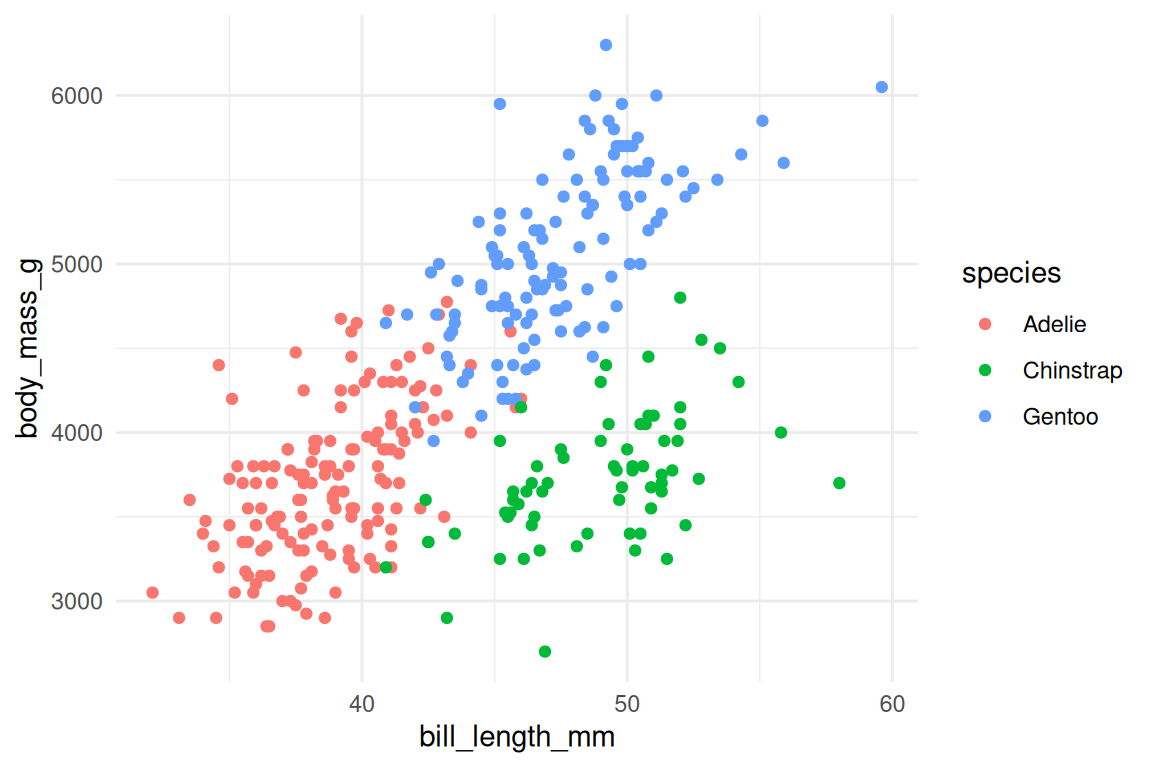
Other useful defaults include theme_classic() (white background, no grid) and theme_bw() (white background, light grid). For fine-grained control, theme() adjusts individual elements:
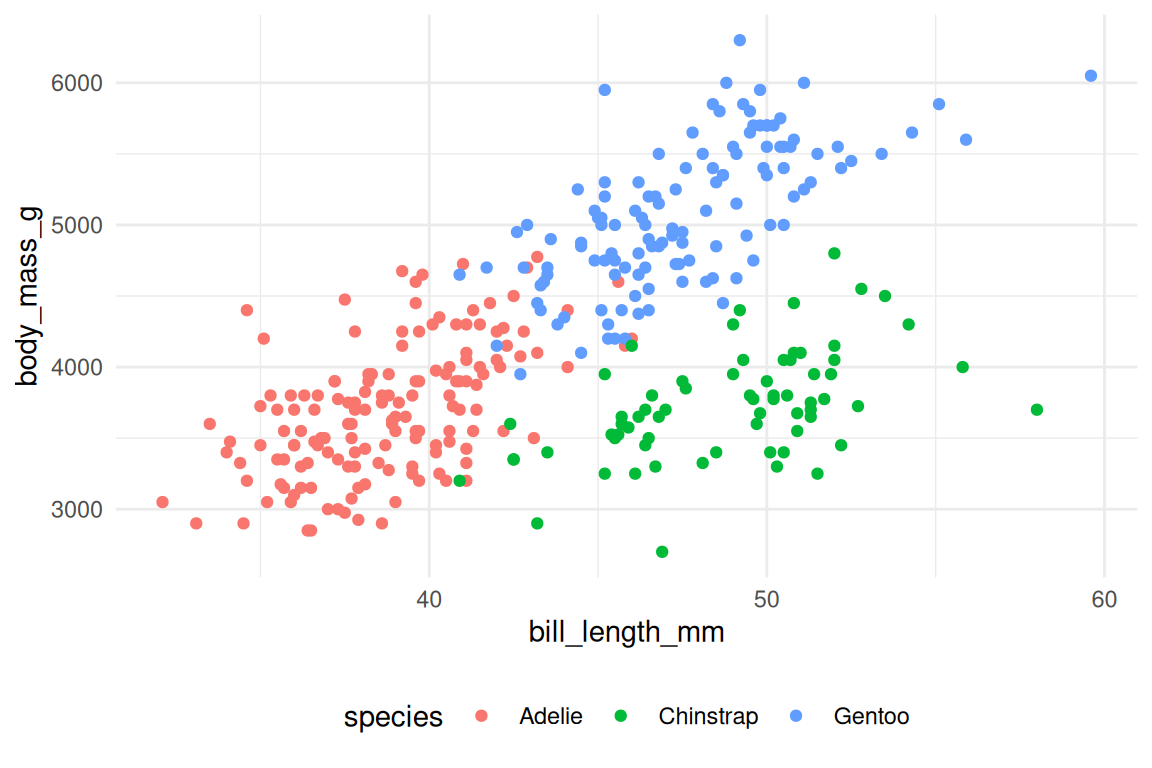
ggplot(penguins, aes(x = bill_length_mm, y = body_mass_g, fill = species, shape = species)) +
  geom_point(stroke = 0.4, size = 2) +
  scale_fill_viridis_d() +
  scale_shape_manual(values = c(21, 22, 24)) +
  theme_minimal() +
  theme(
    legend.position = "bottom",
    plot.title = element_text(face = "bold")
  )
To set a default theme for your entire session, use theme_set():
theme_set(theme_minimal())Themes are cosmetic; clear mappings and good labels come first. Still, pick one default early (theme_minimal() or theme_bw() are the usual choices) and use it everywhere, because three plots in the same report should share a theme.
Exercises
- Apply
theme_classic()to any scatterplot from this chapter. How does it differ fromtheme_minimal()? - Use
theme(axis.text.x = element_text(angle = 45, hjust = 1))to rotate x-axis labels. When is this useful?
17.7 Putting it together
Read this example like a sentence: take penguins, remove missing sex, map bill length to x and mass to y and species to color, draw points, add linear fits, split by sex, use viridis colors, label everything, apply a minimal theme.
penguins |>
  dplyr::filter(!is.na(sex)) |>
  ggplot(aes(x = bill_length_mm, y = body_mass_g, color = species, fill = species, shape = species, linetype = species)) +
  geom_point(alpha = 0.6, stroke = 0.4, size = 2, color = "grey30") +
  geom_smooth(method = "lm", se = FALSE, linewidth = 0.8) +
  facet_wrap(~ sex) +
  scale_color_viridis_d() +
  scale_fill_viridis_d() +
  scale_shape_manual(values = c(21, 22, 24)) +
  labs(
    x = "Bill length (mm)",
    y = "Body mass (g)",
    color = "Species",
    fill = "Species",
    shape = "Species",
    linetype = "Species",
    title = "Bill length vs body mass by species and sex"
  ) +
  theme_minimal()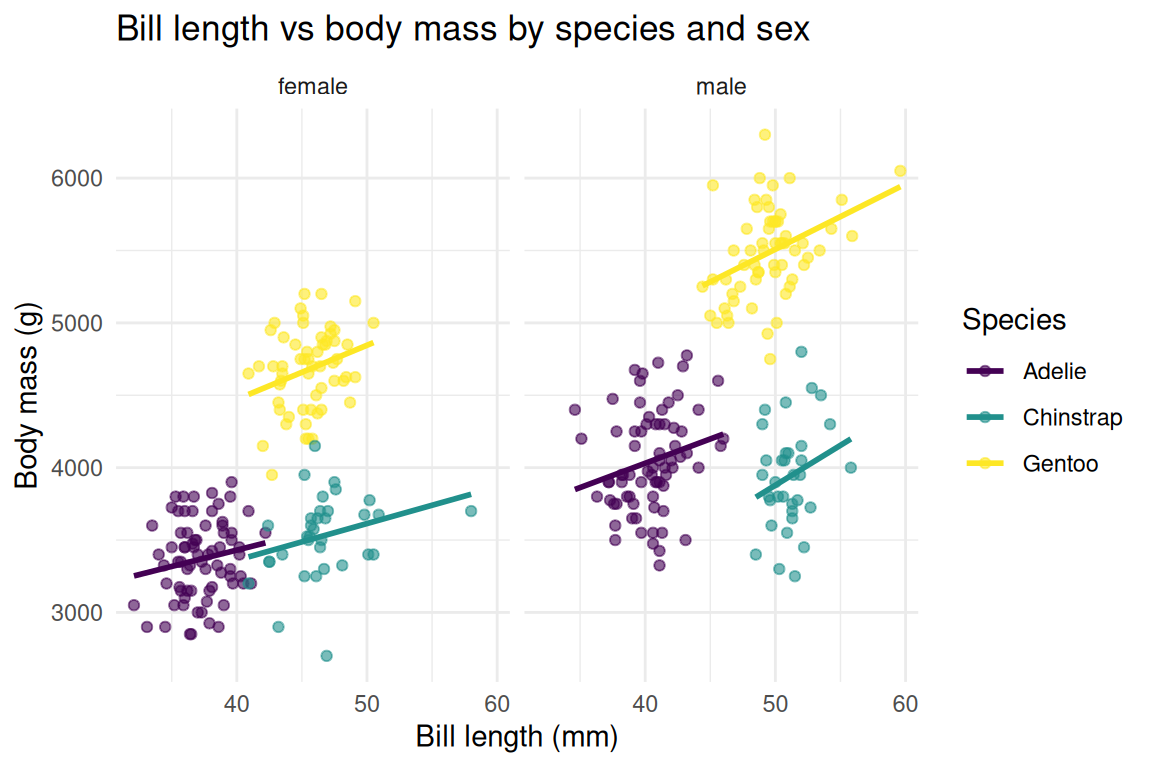
The pipe feeds data into ggplot(), and after that + composes the layers. Each line adds one component, so you can read the full specification top to bottom. Most plots follow that shape: start with the data, pipe it through whatever filtering or summarising it needs, hand it to ggplot() with the aesthetic mappings, add geoms, then refine with scales, facets, labels, and a theme. Each step is independent: swap geom_point() for geom_jitter() and nothing else in the specification changes. + is doing more work than it looks like.
Base R’s plot(), barplot(), and hist() are self-contained functions, each with its own parameter names and its own assumptions about data shape. Adding a fitted line to a scatterplot means calling abline() after plot(), a second function that depends on the first having already drawn to the graphics device. There is no plot object to inspect or modify; the drawing has already happened. In ggplot2 each layer is an independent object, and combining two with + produces a new plot object you can store, modify, and pass around before anything touches the screen. The layers compose because they are values, not side effects, the same property that makes pipe chains work (Chapter 15).
When the plot object is finally drawn, ggplot2 runs it through a fixed sequence: the data, then the stat (this is where a histogram counts), then the scales (values become colors and axis positions), then the coordinate system (positions become pixels), then the geom draws. Each step takes a data structure and returns one, so the whole thing is function composition, render ∘ coord ∘ scale ∘ stat, and a geom_*() only decides what the last step draws.
NoteThe lambda calculus connection
aes() returns unevaluated expressions. When you write aes(x = bill_length_mm), R does not look up bill_length_mm in your environment; it captures the expression and evaluates it later inside the data frame. The mapping is a description of a computation, the way a lambda expression describes a function without running it, and the capturing is the quoting mechanism of Chapter 26.
+ on layers is the same monoid as the pipe (Chapter 15): combining two layers gives a layer, the grouping does not matter, and the empty ggplot() is the identity. Reduce() folds over exactly this structure in Chapter 21.
Exercises
- Build a plot from scratch: filter
penguinsto only Adelie penguins, then create a scatterplot of flipper length vs body mass, colored by island. Add proper labels and a theme. - Create a faceted histogram of
body_mass_gbyspecies, withbinwidth = 100. Usefill = speciesand setalpha = 0.7. - Start from the full example above and modify it: change the geom to
geom_density2d(), remove the faceting, and switch totheme_classic(). What does the plot reveal?
17.8 Common mistakes
A variable inside aes() creates a mapping; a value outside aes() sets a constant. If your legend looks unexpected, check which side of aes() your arguments are on (Section 17.2).
The pipe feeds data into ggplot(), but after that first call every addition uses +. Writing |> where + belongs trips up every beginner exactly once, and ggplot2 now recognises the slip: the error says that mapping must be created by aes() and asks whether you used |> instead of +. ggplot2 uses + partly for historical reasons (it predates magrittr by seven years and the native pipe by fourteen) and partly because the two operators mean different things: the pipe passes data through a sequence of transformations, while + accumulates structure into one object.
# Wrong
ggplot(penguins, aes(x = bill_length_mm, y = body_mass_g)) |>
  geom_point()

# Right
ggplot(penguins, aes(x = bill_length_mm, y = body_mass_g)) +
  geom_point()
If you find yourself writing geom_line(aes(y = col_a)) and then geom_line(aes(y = col_b)) for different columns, that is a signal to pivot_longer() first (Chapter 16) and map the new column to an aesthetic.
Complex calculations inside aes() belong in mutate() (Chapter 14). Something like aes(x = log(value + 1) / max(value)) is hard to read and harder to debug; create the column, then map it.
Too many colors, too many geoms, too much data crammed into one frame. If a plot is hard to read, split it into facets or separate plots. A simpler plot almost always communicates better.
Most ggplot2 errors come from structure: the data is in the wrong shape, the mapping is in the wrong place, or the wrong operator connects the layers. When a plot doesn’t look right, check the data and the mappings before adjusting visual parameters.
Once the plot is right, you need to get it out of R.
17.9 Saving plots
ggsave() writes the most recent plot to a file:
ggsave("penguins_scatter.png", width = 8, height = 5, dpi = 300)The file format is inferred from the extension: .png, .pdf, .svg, .jpg. For publication, PDF or SVG gives you vector graphics that scale cleanly at any size. For slides and web, PNG at 300 DPI is standard.
You can also pass a stored plot object explicitly:
p <- ggplot(penguins, aes(x = bill_length_mm, y = body_mass_g, color = species)) +
  geom_point() +
  theme_minimal()

ggsave("penguins_scatter.pdf", plot = p, width = 8, height = 5)
A ggplot object describes a plot and produces no pixels until you print it or save it; p above is a description, and ggsave() is what renders it. The width and height arguments set the output size in inches, and getting them right matters more than any theme adjustment: a plot squeezed into half its natural width produces unreadable axis labels, and a plot stretched too wide leaves the points floating in empty space. Experiment with dimensions before finalizing.
TipOpinion
Always save with ggsave(), never with right-click or the RStudio export button. ggsave() is reproducible: the same code produces the same file tomorrow. The export button is a one-off action with no record of the dimensions or resolution you chose, and six months from now, when a reviewer asks you to regenerate Figure 3 at higher resolution, you will understand why that matters.