penguin <- list(
  species = "Adelie",
  mass = 3750,
  measurements = c(39.1, 18.7, 181)
)
penguin
#> $species
#> [1] "Adelie"
#>
#> $mass
#> [1] 3750
#>
#> $measurements
#> [1] 39.1 18.7 181.010 Lists
You have a penguin. It has a species (character), a body mass (double), and a vector of bill and flipper measurements (also doubles). Try cramming all of that into a single atomic vector and R will coerce everything to character, because vectors are strict: one type, no exceptions (Section 4.3). The species survives, the numbers become strings, and the measurements lose their identity as a group. What you need is a container that keeps each piece intact, preserving its type and its shape, without flattening or coercing anything. R calls that container a list.
10.1 Why lists exist
Put the three pieces in a list and each one keeps its type:
species is still a character scalar, mass a numeric scalar, measurements a numeric vector of length 3. Nothing was coerced. This is what makes a list heterogeneous: each element can be a number, a string, a vector of any length, a function, or another list, and none of them interferes with the others.
typeof() puts a name on the container:
typeof(penguin)
#> [1] "list"
R’s documentation calls this a generic vector, to set it apart from the atomic vectors of Section 4.2.
You already used one in Section 7.3 when you stored functions as named elements. A list is the same structure whether it holds numbers, strings, or functions; getting the right element back out is where the care is needed.
Exercises
- Create a list with your name (character), your age (numeric), and your three favourite colours (a character vector). Print it.
- What does
typeof(list(1, "a", TRUE))return? - What happens if you use
c()instead oflist()to combine1,"a", andTRUE? Why is the result different?
10.2 Creating and accessing lists
10.2.1 Creating lists
list() creates a list, and elements can be named or unnamed:
named <- list(a = 1, b = "hello", c = TRUE)
unnamed <- list(1, "hello", TRUE)
Named elements are easier to work with because you can refer to them by meaning rather than position; unnamed elements force you to remember which slot holds what.
10.2.2 The train analogy
x <- list(a = 10, b = c(1, 2, 3), c = "hello")Ask for the first element with one bracket:
x[1]
#> $a
#> [1] 10
typeof(x[1])
#> [1] "list"
Still a list, just a shorter one. Now with two:
x[[1]]
#> [1] 10
typeof(x[[1]])
#> [1] "double"
Now it is the number 10, with no list around it. Think of the list as a train where each carriage holds its own cargo. x[1] returns the first carriage still attached to the train, and x[[1]] opens the carriage and pulls out what is inside.
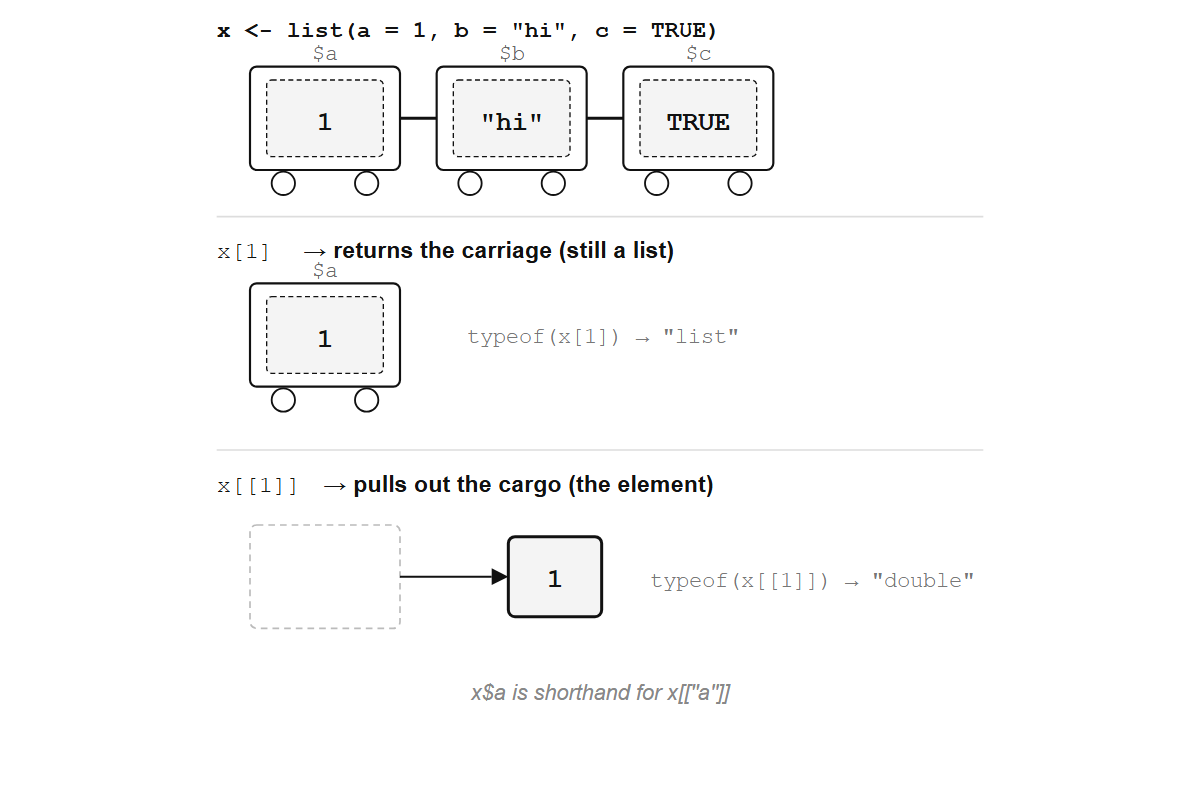
x[1] returns the carriage (still a list); x[[1]] pulls out the cargo (the element itself).
[ keeps the container and [[ removes it, and mixing the two up is the most common source of confusion with lists.
$ is shorthand for [[ with a name:
x$b
#> [1] 1 2 3
x[["b"]]
#> [1] 1 2 3
Both return the same thing. $ is convenient for interactive use, but [[ is necessary when the name is stored in a variable:
key <- "b"
x[[key]]
#> [1] 1 2 3x$key
#> NULLx$key looks for a literal element named "key", not for the value stored in the variable key. Whenever the name is computed or passed as an argument, you need [[.
You can select multiple elements with [:
x[c(1, 3)]
#> $a
#> [1] 10
#>
#> $c
#> [1] "hello"
x[c("a", "c")]
#> $a
#> [1] 10
#>
#> $c
#> [1] "hello"
But [[ only works with a single index, extracting one element at a time.
TipOpinion
Default to [[ and $ for extracting elements. Use [ only when you need a sub-list. If you find yourself writing x[1][[1]], you wanted x[[1]] all along.
Exercises
- Given
x <- list(a = 10, b = 20, c = 30), predict the output ofx[2],x[[2]], andx$bbefore running them. - What is
typeof(x[1])versustypeof(x[[1]])? Explain the difference. - Create a variable
name <- "c". Use it to extract the element"c"from the listx. Which accessor works?
10.3 Nested lists
A list element can be another list, which means that a single list can grow into a tree of arbitrary depth:
study <- list(
  site = "Palmer Station",
  years = 2007:2009,
  species = list(
    list(name = "Adelie", count = 152),
    list(name = "Gentoo", count = 124),
    list(name = "Chinstrap", count = 68)
  )
)
str() reveals the shape:
str(study)
#> List of 3
#>  $ site   : chr "Palmer Station"
#>  $ years  : int [1:3] 2007 2008 2009
#>  $ species:List of 3
#>   ..$ :List of 2
#>   .. ..$ name : chr "Adelie"
#>   .. ..$ count: num 152
#>   ..$ :List of 2
#>   .. ..$ name : chr "Gentoo"
#>   .. ..$ count: num 124
#>   ..$ :List of 2
#>   .. ..$ name : chr "Chinstrap"
#>   .. ..$ count: num 68
str() is the single most useful function for lists. It works on any R object, but with lists it shows you the nesting, the types, and the lengths in one compact summary. Get in the habit of calling it on anything you did not build yourself.
This is why R’s documentation also calls lists recursive vectors: an element can itself be a list, so one list can grow into a tree of any depth.
Inspecting is only half the problem. How do you reach into the tree and pull out what you need? Chain [[ or $:
study$species[[1]]$name
#> [1] "Adelie"
study[["species"]][[2]][["count"]]
#> [1] 124
Each [[ or $ steps one level deeper: study$species is a list of three lists, study$species[[1]] is the first of those, and study$species[[1]]$name is the string "Adelie". Sub-lists are branches and atomic values are leaves, which is also the shape of a file system, of a JSON document from a web API, and of the object lm() returns. All of them read into R as nested lists because all of them are trees.
Exercises
- Given the
studylist above, extract the count for Chinstrap penguins. - Use
str()on the result oflm(mpg ~ wt, data = mtcars). How many top-level elements does the model object have? - Create a nested list representing a book: title, author, and a list of chapters (each with a number and a title). Extract the title of the second chapter.
10.4 Lists as the backbone of R
A data frame is a list:
df <- data.frame(x = 1:3, y = c("a", "b", "c"))
typeof(df)
#> [1] "list"
is.list(df)
#> [1] TRUE
Each column is one element of that list, and the data frame simply adds a constraint: all columns must have the same length. Underneath, df$x works exactly like list access because it is list access.
A linear model is a list:
fit <- lm(mpg ~ wt, data = mtcars)
typeof(fit)
#> [1] "list"
names(fit)
#>  [1] "coefficients"  "residuals"     "effects"       "rank"
#>  [5] "fitted.values" "assign"        "qr"            "df.residual"
#> [9] "xlevels" "call" "terms" "model"fit$coefficients, fit$residuals, and fit$fitted.values are ordinary $ extractions on a list. The "lm" class attribute changes how R prints and summarizes the object, not how you get data out of it.
Data frames (Chapter 11), model objects, and environments are all lists (or list-like structures) with different rules about what they can contain. The most interesting rule is also the simplest: what happens when every element is a vector of the same length?
Exercises
- Run
typeof()on a data frame you create. Then runis.list()on it. What do you conclude? - Fit a model with
lm(Sepal.Length ~ Petal.Length, data = iris). Usenames()to see its elements, then extract the R-squared fromsummary()of the fit. (Hint:str(summary(fit))will help.) - What does
length()return for a data frame with 5 columns and 100 rows? Why?
10.5 Modifying lists
Adding an element is as simple as assigning to a new name:
x <- list(a = 1, b = 2)
x$c <- 3
x[["d"]] <- "new"
str(x)
#> List of 4
#>  $ a: num 1
#>  $ b: num 2
#>  $ c: num 3
#>  $ d: chr "new"
Removing an element means setting it to NULL:
x$b <- NULL
str(x)
#> List of 3
#>  $ a: num 1
#>  $ c: num 3
#>  $ d: chr "new"
b is gone, not set to NULL. This is a common trap: assigning NULL to a list element deletes it entirely. If you actually want to store NULL as a value, you need x["e"] <- list(NULL):
x["e"] <- list(NULL)
str(x)
#> List of 4
#>  $ a: num 1
#>  $ c: num 3
#>  $ d: chr "new"
#>  $ e: NULL
Now e exists and its value is NULL. The single-bracket assignment with list(NULL) is the only way to store an actual NULL in a list, an asymmetry worth memorizing because it bites everyone at least once.
Replacing an element is just assignment to an existing name:
x$a <- 100
x$a
#> [1] 100
R uses copy-on-modify for lists, the same semantics as for vectors (Section 9.4): it copies only the parts that change, not the entire structure, so for practical purposes you can treat assignment as modifying in place.
Exercises
- Create a list with elements
x = 1andy = 2. Add an elementz = 3, then deletex. Print the result. - What does
length()return after you delete an element from a list? - Try
x$a <- NULLon a list whereaexists. Then tryx["a"] <- list(NULL). What is the difference?
10.6 Linked lists
Three one-line functions are enough to build a data structure R does not ship with:
cons <- function(head, tail) list(head = head, tail = tail)
car  <- function(lst) lst$head
cdr  <- function(lst) lst$tail
cons builds a node holding a value and whatever comes after it, car returns the value, and cdr returns the rest. Chain three nodes:
ll <- cons(1, cons(2, cons(3, NULL)))
str(ll)
#> List of 2
#>  $ head: num 1
#>  $ tail:List of 2
#>   ..$ head: num 2
#>   ..$ tail:List of 2
#>   .. ..$ head: num 3
#>   .. ..$ tail: NULL
Each node is a two-element list whose tail is the next node, and the last tail is NULL. This is a linked list. To walk it, recurse until you hit NULL:
ll_to_vector <- function(lst) {
  if (is.null(lst)) return(c())
  c(car(lst), ll_to_vector(cdr(lst)))
}
ll_to_vector(ll)
#> [1] 1 2 3
Adding a node at the front costs one cons call however long the chain is, while reaching element k means following k tail pointers. An R vector is the reverse: element k is one address computation away, and putting a value in front copies everything. R does not use linked lists for everyday work because sum(), and the BLAS routines behind matrix algebra, expect one contiguous block of doubles that a C loop can walk with a pointer, and a linked list scatters its nodes across memory. R’s own lists are contiguous arrays of pointers too, which is why x[[k]] on a list is O(1). Lisp made the cons cell its primary structure instead, which is where the names come from.
NoteFrom Church encoding to cons cells
The names car and cdr come from Lisp, where in 1958 they abbreviated “contents of the address register” and “contents of the decrement register”, the two halves of a machine word on the IBM 704. The structure itself is older. In lambda calculus a pair is λh.λt.λf. f h t, a function that captures two values and waits for a selector; car passes a selector that returns the first value and cdr one that returns the second. A linked list is a chain of such pairs ending in a nil value, and cons, car, and cdr remain the standard names for the three operations across functional languages.
R and Lisp descend from the same calculus, but the engineering diverged early. Lisp built up answers one cons at a time, peeling the head off a list and recurring on the tail. R committed to contiguous arrays that the C runtime walks in one pass, and that choice propagated: R has sapply where Lisp has mapcar, and [ extracts by position where Lisp peels from the front. The linked-list code above shows what the other branch of the family looks like from the inside.
Exercises
- Using
cons,car, andcdrdefined above, build the linked list(10, 20, 30)and extract the second element without converting to a vector. - Write a function
ll_lengththat counts the number of nodes in a linked list by recursing throughcdruntilNULL. - Write a function
ll_mapthat takes a linked list and a function, and returns a new linked list with the function applied to each element. Test it by doubling every element ofcons(1, cons(2, cons(3, NULL))).
10.7 Looking ahead
Lists hold anything, including other lists. Constrain that freedom (require every element to be a vector of the same length) and the general-purpose container becomes a table.