42
#> [1] 424 Vectors
Type 42 in R.
That [1] has been there since Chapter 1, quietly announcing something you probably didn’t notice: you never made a number. You made a vector.
4.1 There are no scalars
Ask R how long a number is:
length(42)
#> [1] 1
length("hello")
#> [1] 1
length(TRUE)
#> [1] 1
Each one has a length, and the length is 1. 42 is a numeric vector with one element, "hello" a character vector with one element, TRUE a logical vector with one element. Most languages keep a single number and a collection of numbers as two different kinds of thing, a scalar and an array. R has only the collection.
Why would a language erase the distinction between “one thing” and “many things”? Because S (Section 2.3), the language R descends from, was built for people who work with columns of data. A single temperature reading is rarely interesting on its own; you care about the whole column. So S made the column the basic unit of computation, and R inherited that decision wholesale, which means every operation you write, from arithmetic to comparison, has to reckon with that choice.
x * 2 works the same whether x has one element or a million, because x is always a vector and R needs no special case for scalars. But how do you build them?
4.2 Atomic vectors
You make a vector with c(), short for “combine”:
temperatures <- c(72, 85, 61, 90, 78)
temperatures
#> [1] 72 85 61 90 78
c() can combine vectors too:
morning <- c(58, 62, 55)
afternoon <- c(75, 80, 71)
all_temps <- c(morning, afternoon)
all_temps
#> [1] 58 62 55 75 80 71
It flattens everything into a single vector; there are no nested vectors in R, so c(c(1, 2), c(3, 4)) gives you c(1, 2, 3, 4). Look at what’s happening in c(morning, afternoon):
c(morning, afternoon)
= c(c(58, 62, 55), c(75, 80, 71))
= c(58, 62, 55, 75, 80, 71)
= [58, 62, 55, 75, 80, 71]
Each step replaces a name or function call with its value. morning becomes c(58, 62, 55), the nested c() calls flatten into one, and at the last step the computer takes over: R allocates a contiguous block of memory and stores six numbers side by side.
This is the same term replacement that folded add(3, add(5, 10)) down to 18 in Section 1.2. Here, c(morning, afternoon) reduces to a six-element vector. Even building a data structure is a function call that reduces to a value.
NoteGrouping and
NULL
c(c(1, 2), c(3, 4)) and c(1, c(2, c(3, 4))) both produce c(1, 2, 3, 4); the grouping does not matter, so c() is associative. And c(x, NULL) returns x unchanged, so NULL is an identity element for it: combining with NULL does nothing. An operation that is associative and has an identity element is called a monoid. Addition with 0 is one, string concatenation with "" is one, and c() with NULL is one. The same structure is what makes Reduce() work (Chapter 21).
A few shortcuts for common patterns:
1:5
#> [1] 1 2 3 4 5seq(0, 1, by = 0.25)
#> [1] 0.00 0.25 0.50 0.75 1.00rep("hello", 3)
#> [1] "hello" "hello" "hello"1:5 generates integers from 1 to 5, seq() generates a sequence with a specified step size, and rep() repeats a value.
Ask R what type each value is:
typeof(3.14)
#> [1] "double"
typeof(42L)
#> [1] "integer"
typeof("hello")
#> [1] "character"
typeof(TRUE)
#> [1] "logical"
These are the four atomic types you will use constantly. double is a decimal number (even 42 is stored as a double by default), while integer needs an L suffix: 42L. character is text, logical is TRUE or FALSE. Two more types, complex and raw, exist for specialized work; you can ignore them.
Every element in a vector must be the same type. But what happens when you try to break that rule?
Exercises
- What does
c(1, c(2, c(3, 4)))produce? Predict, then check. - Create a vector of the first 10 even numbers using
seq(). - What is
typeof(1)? What abouttypeof(1L)?
4.3 Coercion
Try mixing types in a vector:
c(1, "two", 3)
#> [1] "1"   "two" "3"
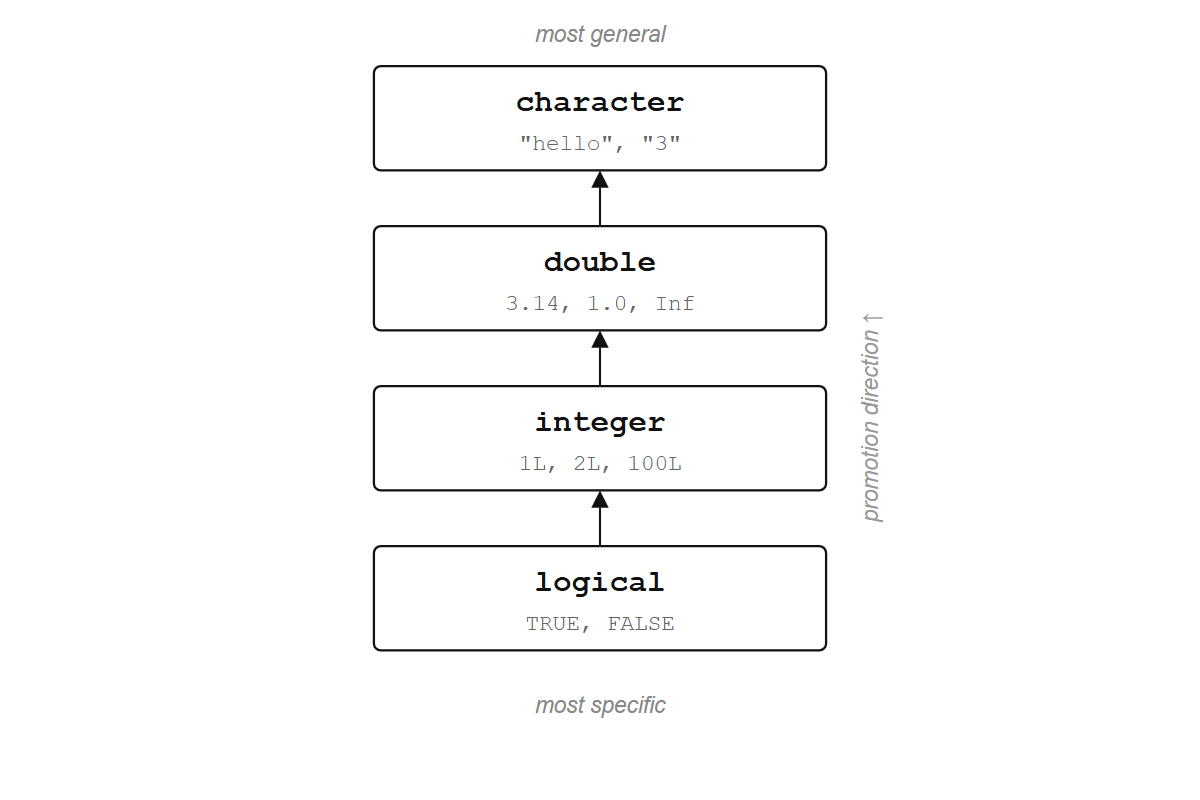
R converted the numbers to text. No warning, no error. This is called coercion, and R follows a fixed hierarchy: logical < integer < double < character. When you mix types, everything gets promoted to the most general one.
c(TRUE, 1, "hello")
#> [1] "TRUE"  "1"     "hello"
TRUE became "1" (first promoted to the integer 1, then to the string "1"), and 1 became "1".
This hierarchy explains a trick from Chapter 1 that might have seemed like magic. sum(scores > 70) works because scores > 70 produces a logical vector, and sum() coerces the logicals to numbers: TRUE becomes 1, FALSE becomes 0, so the count of passing values falls out automatically:
x <- c(65, 82, 71, 90, 55, 78)
x > 70
#> [1] FALSE  TRUE  TRUE  TRUE FALSE  TRUE
sum(x > 70)
#> [1] 4
TipOpinion
R will never warn you about coercion. c(1, 2, "3") quietly becomes all character, and your arithmetic breaks ten lines later with an error message that points nowhere near the real problem. Memorize the hierarchy: logical < integer < double < character. It will save you hours.
Exercises
- What does
TRUE + 1return? What aboutFALSE * 5? - What is
typeof(c(1L, 1.5))? Which type won? - What does
as.numeric("hello")return? Read the warning.
4.4 Vectorized operations
Say you have five temperatures in Fahrenheit and want Celsius. In most languages, you write a loop: go through each element, apply the formula, store the result. In R:
temperatures <- c(72, 85, 61, 90, 78)
(temperatures - 32) * 5/9
#> [1] 22.22222 29.44444 16.11111 32.22222 25.55556
One expression, no loop. The subtraction, multiplication, and division each apply to every element at once. This is a vectorized operation, and it is the default way of working in R.
Comparisons are vectorized too:
temperatures > 75
#> [1] FALSE  TRUE FALSE  TRUE  TRUE
The result is a logical vector of the same length: TRUE where the condition holds, FALSE where it doesn’t.
You can combine comparisons with & (and) and | (or):
temperatures > 60 & temperatures < 85
#> [1]  TRUE FALSE  TRUE FALSE  TRUE
Arithmetic, comparisons, and most built-in functions all work this way, returning a vector of the same length for each input vector. sqrt(), log(), round(), abs(): give them a vector and they return a vector.
sqrt(c(1, 4, 9, 16, 25))
#> [1] 1 2 3 4 5
Written as term replacement, with f standing for sqrt, the call unfolds like this:
f = λx. √x

f(c(1, 4, 9, 16, 25))
= c(f(1), f(4), f(9), f(16), f(25))          # distribute f over the vector
= c((λx. √x)(1), (λx. √x)(4), ..., (λx. √x)(25))  # replace f with its definition
= c(√1, √4, √9, √16, √25)                   # substitute each x
= c(1, 2, 3, 4, 5)
R distributes the function over the vector automatically; you write one application, R performs five. This is Church’s model extended to collections: a function applied to a vector produces a vector of results. sqrt(c(1, 4, 9, 16, 25)) is a single function applied to a single argument, and the fact that the argument contains five numbers is R’s business, not yours.
NoteWhere
√ comes from
Even √ is not a primitive. Start with a rough guess and improve it over and over until it is close enough:
√x = iterate(λguess. (guess + x / guess) / 2, x)Apply the refinement function λguess. (guess + x / guess) / 2 repeatedly and the result converges to √x. Square root reduces to division, addition, and repeated application of a lambda, which are themselves reducible further. At every level, the building blocks are functions applied to arguments.
In practice, R calls C’s sqrt(), which on modern CPUs maps to a hardware instruction. The chip uses a lookup table for a rough estimate, then refines it with the same (guess + x / guess) / 2 step, finishing in 10-20 clock cycles. The abstraction and the silicon converge on the same algorithm.
NoteApply inside, preserve outside
sqrt applied to a five-element vector returns a five-element vector; the function changes the contents, but the container keeps its shape. A structure that lets a function be mapped over it this way is called a functor. Vectors are functors, lists are functors (via lapply), and data frame columns are functors (via mutate). The word comes from category theory, but the idea is concrete: apply inside, preserve outside.
Every line of code in this chapter has run on the same substitution: names replaced by their values in c(morning, afternoon), one function replaced by five applications in sqrt(c(1, 4, 9, 16, 25)), and in both cases an expression reduced to a value.
4.4.1 Recycling
What happens when you operate on two vectors of different lengths?
c(1, 2, 3, 4) + c(10, 20)
#> [1] 11 22 13 24
R recycled the shorter vector, reusing 10, 20 to match the length of the longer one: 1+10, 2+20, 3+10, 4+20. This is also how temperatures - 32 works: 32 is a vector of length 1, and R recycles it five times to match the length of temperatures.
When the lengths don’t divide evenly, R warns you:
c(1, 2, 3, 4, 5) + c(10, 20)
#> Warning in c(1, 2, 3, 4, 5) + c(10, 20): longer object length is not a
#> multiple of shorter object length
#> [1] 11 22 13 24 15
TipOpinion
Recycling is useful when the shorter vector has length 1 (e.g., x * 2, x > 0). For anything else, match your vector lengths explicitly. A recycling warning almost always means a bug.
Exercises
- What does
c(1, 2, 3) * c(0, 1)produce? Does R warn you? - Why does
x - mean(x)work without a loop? (Hint: what length ismean(x)?) - What does
c(TRUE, FALSE) + c(1, 2, 3, 4)produce?
4.5 Indexing
You often need specific elements from a vector, and the [ operator extracts them. The simplest way is by position:
temperatures <- c(72, 85, 61, 90, 78)
temperatures[1]
#> [1] 72
temperatures[c(1, 3, 5)]
#> [1] 72 61 78
A negative index excludes instead:
temperatures[-2]
#> [1] 72 61 90 78
Everything except the second element. You can also index with a logical vector:
temperatures[temperatures > 75]
#> [1] 85 90 78
temperatures > 75 produces c(FALSE, TRUE, FALSE, TRUE, TRUE), and [ keeps only the TRUE elements. You’re asking a yes/no question of every element and keeping the ones that pass. This is filtering, and it will come back in a more powerful form when you learn dplyr::filter() (Chapter 14).
hot <- temperatures > 75
temperatures[hot]
#> [1] 85 90 78
And if the elements have names, you can index by name:
scores <- c(alice = 92, bob = 78, carol = 85)
scores["bob"]
#> bob
#>  78
scores[c("alice", "carol")]
#> alice carol
#>    92    85
You can also use [ to replace elements:
x <- c(10, 20, 30)
x[2] <- 99
x
#> [1] 10 99 30
This looks like it’s changing the vector in place, but R is actually making a copy with the new value and pointing the name x at the copy. The old vector (with 20 in position 2) is gone. This is copy-on-modify, the same idea from Section 3.2: values in R don’t change; names get moved to point at new values. So far, every element in our vectors has been present and accounted for, but real data has gaps.
Exercises
- Extract the last element of
temperatureswithout hard-coding the position. (Hint:length().) - What does
temperatures[c(TRUE, FALSE)]return? How does recycling interact with logical indexing? - Create a named vector of three cities and their populations. Extract two by name.
4.6 Missing values
A sensor fails, a patient skips a visit, a field is left blank. Real data has gaps, and R represents them with NA (“Not Available”):
readings <- c(23.1, NA, 22.5, 24.0, NA, 23.8)
readings
#> [1] 23.1   NA 22.5 24.0   NA 23.8
NA is not zero, and it is not an empty string. It means “I don’t know.” And that uncertainty is contagious: any computation involving an unknown value produces an unknown result.
sum(readings)
#> [1] NA
mean(readings)
#> [1] NA
R is being honest. If you don’t know some of the values, you don’t know the sum. If you want to ignore the missing values, you have to say so explicitly:
sum(readings, na.rm = TRUE)
#> [1] 93.4
mean(readings, na.rm = TRUE)
#> [1] 23.35
na.rm = TRUE means “remove NAs before computing.” Many R functions have this argument.
Find which elements are missing with is.na():
is.na(readings)
#> [1] FALSE  TRUE FALSE FALSE  TRUE FALSE
Filter them out with ! (not):
readings[!is.na(readings)]
#> [1] 23.1 22.5 24.0 23.8
One common trap: you cannot test for NA with ==.
NA == NA
#> [1] NA
This returns NA, not TRUE. Think about it: if you don’t know what x is and you don’t know what y is, you can’t know whether they’re equal. Always use is.na().
Behind every one of these results is a single rule: a value is either present or absent, and any operation on an absent value produces absence. R threads that rule through every arithmetic and comparison operation automatically, which is why NA feels contagious. It is. That’s the point.
NoteThe same rule in Haskell and Rust
In Haskell, the possibility of absence is built into the type system as Maybe. A value is either Just 42 or Nothing, and any operation on Nothing propagates Nothing forward. 1 + NA returning NA in R is the same logic as Haskell’s Nothing >>= f returning Nothing.
Rust adopted the same idea. Its equivalent of Maybe is called Option: a value is Some(42) or None, and None.map(f) returns None. The compiler rejects any code that forgets to check whether a value is present.
R’s approach is looser: nothing stops you from ignoring NA, and you will not find out until your results look wrong. The underlying rule is the same.
The question is what this contagion looks like when you have 344 measurements and a handful of gaps.
Exercises
- What does
c(1, NA, 3) > 2return? What happens to theNA? - How many missing values are in
readings? (Hint: combinesum()andis.na().) - What does
NA | TRUEreturn? What aboutNA & FALSE? One of each pair is notNA. Why?
4.7 Meet penguins
R 4.5 and later includes a dataset called penguins (from the Palmer Archipelago in Antarctica), and it’s a good place to see everything from this chapter working on real measurements. If you’re running an older version, install it with install.packages("palmerpenguins") and load it with library(palmerpenguins).
head(penguins)penguins is a data frame (a table), and we’ll learn about those properly in Chapter 11. For now, the important thing is that you can pull out a single column with $, and that column is a vector:
bill <- penguins$bill_length_mmNow you have a numeric vector of 344 bill length measurements, with some NAs mixed in. Everything from this chapter applies:
length(bill)
typeof(bill)mean(bill, na.rm = TRUE)
range(bill, na.rm = TRUE)sum(is.na(bill))long_bills <- bill[bill > 50 & !is.na(bill)]
length(long_bills)How many penguins have a bill longer than 50 mm? Logical indexing filters the values, is.na() handles missing data, and length() counts the result. One line each, no loops. You wrote five operations in this chapter that would each require explicit iteration in most languages; in R, the vector carried the iteration for you. Data frames (Chapter 11) are built from exactly these vectors, stacked side by side like columns in a spreadsheet.
Exercises
- What is the mean body mass (
penguins$body_mass_g) of the penguins? Don’t forget theNAs. - How many penguins have a flipper length (
penguins$flipper_length_mm) greater than 200? - What is the shortest bill in the dataset? (Hint:
min()withna.rm = TRUE.)