library(palmerpenguins)
#>
#> Attaching package: 'palmerpenguins'
#> The following objects are masked from 'package:datasets':
#>
#>     penguins, penguins_raw
library(stringr)
library(forcats)
library(lubridate)
#>
#> Attaching package: 'lubridate'
#> The following objects are masked from 'package:base':
#>
#> date, intersect, setdiff, union12 Strings, factors, and dates
You have a column of dates in three different formats, a species column that plots in the wrong order, and a free-text field full of trailing whitespace and inconsistent capitalization. Strings, factors, and dates each get a section here and a tidyverse package of their own. The three sections are independent; skip to whichever one is causing you trouble right now.
We will use the palmerpenguins dataset throughout. Load it and the three packages now:
12.1 Character vectors
x <- "hello"
typeof(x)
#> [1] "character"
length(x)
#> [1] 1
A string in R is a character vector of length 1. There is no separate string type; "hello" is character(1), the same kind of atomic vector you met in Section 4.2. Double quotes and single quotes both work. Pick one and stick with it.
TipOpinion
Use double quotes. R’s own style guide does, and so does most code you will encounter in the wild. Single quotes earn their keep inside double-quoted strings: "it's easy".
R uses UTF-8 as its modern string encoding. If accented characters come out garbled, the file is probably Latin-1; stringr::str_conv() or readr::locale(encoding = "latin1") handles that.
NoteWhere UTF-8 comes from
UTF-8 was designed by Ken Thompson and Rob Pike on a placemat in a New Jersey diner in September 1992. It is backward-compatible with ASCII, self-synchronizing, and variable-width (one to four bytes per character).
Special characters use backslash escapes: \n (newline), \t (tab), \\ (literal backslash). Compare print() and cat():
print("line one\nline two")
#> [1] "line one\nline two"
cat("line one\nline two")
#> line one
#> line two
print() shows the escape sequence as literal text; cat() renders it. A small difference, until you spend ten minutes wondering why your output has \n in it instead of a line break.
Base R provides a handful of string tools:
nchar("penguin")
#> [1] 7
paste("Gentoo", "penguin")
#> [1] "Gentoo penguin"
paste0("Gentoo", "penguin")
#> [1] "Gentoopenguin"
sprintf("The %s weighs %d grams", "Gentoo", 5200)
#> [1] "The Gentoo weighs 5200 grams"
nchar() counts characters, paste() joins with a space, paste0() joins without, and sprintf() does formatted substitution borrowing syntax from C. These work, but they are inconsistent in argument order and NA handling, and inconsistency compounds fast once you start chaining operations. What would a consistent interface look like?
Exercises
- What does
nchar(NA)return? What aboutnchar("")? - Use
paste()to combine"Species",":", and"Adelie"into a single string. Then do the same withpaste0(). What is different? - Use
sprintf()to produce the string"Island: Biscoe, n = 168".
12.2 stringr: consistent string operations
str_length("penguin")
#> [1] 7
str_sub("penguin", 1, 4)
#> [1] "peng"
str_c("Gentoo", "penguin", sep = " ")
#> [1] "Gentoo penguin"
str_length() counts characters like nchar(), str_sub() extracts by position, and str_c() combines strings. Every function in stringr follows the same rule: the name starts with str_, the string is the first argument, and the pattern, when there is one, comes second. Once you know the convention you can guess a function’s name before looking it up. Where paste() turns a missing value into the text "NA", str_c() keeps it missing:
paste("hello", NA)
#> [1] "hello NA"
str_c("hello", NA)
#> [1] NA
Case conversion and whitespace cleaning:
str_to_upper("gentoo")
#> [1] "GENTOO"
str_to_title("gentoo penguin")
#> [1] "Gentoo Penguin"
str_trim("  messy data  ")
#> [1] "messy data"
str_squish("  too   many   spaces  ")
#> [1] "too many spaces"
str_detect() answers the question grepl() answers in base R, whether each string contains the pattern:
species <- penguins$species
str_detect(species, "Gentoo")[1:10]
#>  [1] FALSE FALSE FALSE FALSE FALSE FALSE FALSE FALSE FALSE FALSE
Extraction and replacement:
islands <- c("Biscoe Island", "Dream Island", "Torgersen Island")
str_extract(islands, "^[A-Za-z]+")
#> [1] "Biscoe"    "Dream"     "Torgersen"
str_replace(islands, "Island", "Isl.")
#> [1] "Biscoe Isl."    "Dream Isl."     "Torgersen Isl."
str_replace() changes the first match in each string and str_replace_all() every match, the way sub() and gsub() do in base R. Splitting:
str_split("one-two-three", "-")
#> [[1]]
#> [1] "one"   "two"   "three"
str_split() returns a list because each input string could split into a different number of pieces. A list is the container for output of uneven length (Chapter 10), which is also why strsplit() returns one in base R.
On the penguins data:
str_to_upper(levels(penguins$island))
#> [1] "BISCOE"    "DREAM"     "TORGERSEN"
sum(str_detect(penguins$species, "Adelie"))
#> [1] 152
Exercises
- How many penguins have species names containing the letter “e”? Use
str_detect(). - Use
str_sub()to extract the first three letters of each island name inpenguins$island. - Use
str_replace_all()to replace all spaces in"Gentoo penguin species"with underscores.
12.3 Regex essentials
str_detect() has so far matched literal text. Ask it for every string that starts with a capital letter and it needs a different kind of pattern:
str_detect(c("Hello", "world", "R"), "^[A-Z]")
#> [1]  TRUE FALSE  TRUE
^ anchors the match to the start of the string and [A-Z] matches one capital letter. A pattern like this is a regular expression, a small language for describing text, and the same patterns work in Python, JavaScript, and grep on the command line. str_view() shows what a pattern matches, which makes it the tool to build one with:
fruits <- c("apple", "banana", "cherry", "date", "elderberry")
str_view(fruits, "[aeiou]")
#> [1] │ <a>ppl<e>
#> [2] │ b<a>n<a>n<a>
#> [3] │ ch<e>rry
#> [4] │ d<a>t<e>
#> [5] │ <e>ld<e>rb<e>rry
Two more that come up constantly:
# Strings that end in a digit
str_detect(c("room101", "lobby", "floor3"), "\\d$")
#> [1]  TRUE FALSE  TRUE

# Extract numbers from text
str_extract("penguin weighs 5200 grams", "\\d+")
#> [1] "5200"
\\d is any digit, $ anchors to the end of the string, and + means one or more of whatever precedes it. The doubled backslash exists because R strings process backslashes first: to get \d to the regex engine, you write "\\d" in R. The building blocks used so far, and the handful of others you will need:
| Pattern | Matches |
|---|---|
. |
Any single character |
^ |
Start of string |
$ |
End of string |
[abc] |
Any of a, b, or c |
[0-9] |
Any digit |
+ |
One or more of the preceding |
* |
Zero or more of the preceding |
? |
Zero or one of the preceding |
(A|B) |
A or B (alternation) |
\\d |
Digit (same as [0-9]) |
\\s |
Whitespace |
\\w |
Word character (letter, digit, underscore) |
?regex has the full reference.
NoteWhere regular expressions come from
Regular expressions come from formal language theory, where Stephen Kleene defined regular languages in 1956 using concatenation, alternation, and closure (repetition). Ken Thompson implemented them in the QED editor in 1968 and grep in 1973; the * quantifier is still called the Kleene star, after Kleene.
TipOpinion
You do not need to memorize regex. Know that it exists, know the basics from the table above, and keep the stringr cheatsheet within arm’s reach. That is enough.
Exercises
- Write a regex that matches strings starting with “G” and ending with “o”. Test it on
c("Gentoo", "Galileo", "Go", "Gusto", "Goo"). - Use
str_extract_all()to pull all words (sequences of\\w+) from"The quick brown fox". - Use
str_detect()and a regex to find which island names inpenguins$islandcontain two consecutive vowels.
12.4 Why factors exist
Strings handle free text. Species, island, and treatment group are a different kind of column: a fixed set of values, and an order among them that matters for plots and models. Plot penguin species as a bar chart and the bars come out alphabetically, Adelie, Chinstrap, Gentoo. A character vector carries no ordering, so there is no way to tell the plot to put Gentoo first. R’s answer is to store such a column as integers with labels:
x <- factor(c("male", "female", "female"))
x
#> [1] male   female female
#> Levels: female male
typeof(x)
#> [1] "integer"
unclass(x)
#> [1] 2 1 1
#> attr(,"levels")
#> [1] "female" "male"
typeof() returns "integer", and unclass() strips the shell to show what is stored: 2, 1, 1 with a lookup table, 1 = "female" and 2 = "male", alphabetical by default. This is a factor.
The lookup table saves memory, and it does something more useful than that. Ten thousand observations of three species are ten thousand integers and a three-entry table rather than ten thousand copies of the string "Adelie". The declared levels are also a contract: once factor(species, levels = c("Adelie", "Chinstrap", "Gentoo")) has run, those three values can appear in the column and nothing else, so a typo such as "adelie" fails at assignment instead of turning into a fourth species inside a model. The same contract lets lm() build a dummy variable for every level, including one absent from the subset you happen to be fitting.
NoteSum types
In type theory a factor is a sum type: the structure of a logical value (Section 8.1), generalized from two variants (Bool = TRUE | FALSE) to n (Species = Adelie | Chinstrap | Gentoo). A data frame combines fields with AND, the product type from the previous chapter; a factor chooses one variant with OR.
The old data.frame() default converted strings to factors (Section 11.2), which is why so much older code carries the stringsAsFactors = FALSE incantation.
Factors earn their place wherever the set of values or their order matters: the order of bars, legends, and facets in a plot; the levels that lm() and glm() turn into coefficients; months, Likert scales, treatment groups. For filtering and counting, a character vector is fine. The moment a plot needs its bars in an order that tells a story, you will reach for factors, and then the question is how to rearrange the levels without pain.
Exercises
- Create a factor from
c("low", "medium", "high", "low", "high"). What are the levels? In what order? - Use
unclass()to see the integer codes. Which integer corresponds to “low”? - What happens if you try to assign a value that is not in the levels? Try
x[1] <- "extreme"on your factor.
12.5 forcats: taming factors
Base R’s factor() lets you set levels manually:
sizes <- factor(c("small", "medium", "large"), levels = c("small", "medium", "large"))
sizes
#> [1] small  medium large
#> Levels: small medium large
The levels argument controls the allowed values and their order. Without it, R defaults to alphabetical, which is why “high” comes before “low” and plots look wrong. But manually specifying levels for every factor in every analysis gets tedious fast, and tedium breeds errors.
forcats provides cleaner tools, all starting with fct_:
# Reorder levels manually
fct_relevel(sizes, "large", "medium", "small")
#> [1] small  medium large
#> Levels: large medium small
# Order levels by frequency in the data
fct_infreq(penguins$species) |> table()
#>
#> Adelie Gentoo Chinstrap
#> 152 124 68# Collapse rare levels into "Other"
fct_lump_n(penguins$species, n = 2) |> table()
#>
#> Adelie Gentoo Other
#> 152 124 68# Rename levels
fct_recode(penguins$species, AP = "Adelie", GP = "Gentoo", CP = "Chinstrap") |> head()
#> [1] AP AP AP AP AP AP
#> Levels: AP CP GPThe most useful function is fct_reorder(), which reorders levels by a summary of another variable:
library(ggplot2)

penguins_clean <- penguins[!is.na(penguins$body_mass_g), ]

ggplot(penguins_clean, aes(x = fct_reorder(species, body_mass_g, median), y = body_mass_g)) +
  geom_boxplot() +
  labs(x = "Species (ordered by median body mass)", y = "Body mass (g)")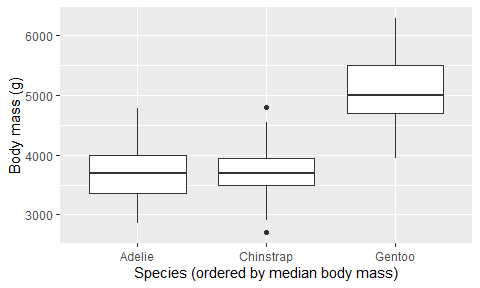
Without fct_reorder(), species appear alphabetically: Adelie, Chinstrap, Gentoo. With it, they appear in order of median body mass, and the axis now carries information about the penguins instead of about the alphabet.
Exercises
- Use
fct_infreq()onpenguins$islandto see which island has the most observations. - Use
fct_lump_n()withn = 1onpenguins$species. What happens? - Create a bar chart of
penguins$specieswith bars ordered by frequency (hint:fct_infreq()insideaes()).
12.6 Dates and times
Add one month to January 31. February 28? February 31, which does not exist? An error? Reasonable tools disagree, and the disagreement is a hint of what date arithmetic has to handle: months of different lengths, leap years, time zones, and daylight-saving transitions. Start with what R stores:
today <- Sys.Date()
today
#> [1] "2026-09-04"
typeof(today)
#> [1] "double"
unclass(today)
#> [1] 20700
A Date is a double counting days since 1970-01-01. The epoch comes from Unix, which measured time in seconds from that date, and R, Python, JavaScript, and most databases inherit it. For a date with a time of day, R has POSIXct, seconds since the same epoch and the class to use in data frames, and POSIXlt, the same instant stored as a named list of components, which you will rarely need.
NoteThe Year 2038 problem
32-bit signed integers can count seconds from 1970 until January 19, 2038.
Date arithmetic works as you would expect:
as.Date("2026-03-07") - as.Date("2026-01-01")
#> Time difference of 65 days
R returns a difftime object. Subtraction works, and so does addition with scalars:
as.Date("2026-01-01") + 30
#> [1] "2026-01-31"
The base R parsing function is as.Date(), which expects ISO 8601 format ("YYYY-MM-DD") by default:
as.Date("2026-03-07")
#> [1] "2026-03-07"
as.Date("07/03/2026", format = "%d/%m/%Y")
#> [1] "2026-03-07"
The format argument uses %Y (4-digit year), %m (month), %d (day), and similar codes. These are hard to remember and easy to get wrong, especially when your data mixes formats. Is "03/07/2026" March 7th or July 3rd? The format string decides, and if you pick wrong, R will not complain.
Exercises
- What day number (since 1970-01-01) is today? Use
unclass(Sys.Date()). - What date is 1000 days from today? Use
Sys.Date() + 1000. - How many days are between
"2024-02-28"and"2024-03-01"? (2024 is a leap year.)
12.7 lubridate: dates for humans
Those %Y/%m/%d format codes? lubridate lets you forget them. Its parsing functions are named after the order of components, so the function name is the format:
ymd("2026-03-07")
#> [1] "2026-03-07"
dmy("07/03/2026")
#> [1] "2026-03-07"
mdy("03-07-2026")
#> [1] "2026-03-07"
All three produce the same date. No format strings to memorize, no ambiguity about which code means what.
For date-times:
ymd_hms("2026-03-07 14:30:00")
#> [1] "2026-03-07 14:30:00 UTC"
Extracting components:
d <- ymd("2026-03-07")
year(d)
#> [1] 2026
month(d)
#> [1] 3
day(d)
#> [1] 7
wday(d, label = TRUE)
#> [1] Sat
#> Levels: Sun < Mon < Tue < Wed < Thu < Fri < Sat
Date arithmetic with human-readable units:
d + days(30)
#> [1] "2026-04-06"
d + months(1)
#> [1] "2026-04-07"
d + years(1)
#> [1] "2027-03-07"
Now back to January 31:
ymd("2026-01-31") + months(1)
#> [1] NA
ymd("2026-01-31") %m+% months(1)
#> [1] "2026-02-28"
+ months(1) lands on a day that does not exist and returns NA rather than picking a date for you. %m+% is the operator that rolls back to the last valid day, February 28, or 29 in a leap year. Both are defensible answers to the question that opened the previous section; lubridate makes you choose.
The days(30) above is a period, a count of calendar days. lubridate also has durations, exact counts of seconds:
days(1)
#> [1] "1d 0H 0M 0S"
ddays(1)
#> [1] "86400s (~1 days)"
The two differ across a daylight-saving transition, where a calendar day has 23 or 25 hours:
x <- ymd_hms("2026-03-28 12:00:00", tz = "Europe/Vienna")
x + days(1)
#> [1] "2026-03-29 12:00:00 CEST"
x + ddays(1)
#> [1] "2026-03-29 13:00:00 CEST"
The period lands at noon the next day; the duration lands at one o’clock, 86,400 seconds later. For most work, periods (days(), months(), years()) are what you want, and durations (ddays(), dhours()) are for physical time, the kind a stopwatch measures. A third kind of span, the interval, is anchored at a start and an end:
# How old is R? (first public release: 1993-08-01)
interval(ymd("1993-08-01"), Sys.Date()) %/% years(1)
#> [1] 33
TipOpinion
Parse with lubridate, extract with lubridate, do arithmetic with lubridate. Reach for base R date functions only when you need zero dependencies.
Exercises
- Parse the following dates:
"15-Jan-2024","2024/06/30","December 25, 2023". Which lubridate function does each need? - What day of the week were you born? Use
ymd()andwday(label = TRUE). - Compute the number of days between
"2020-03-01"and"2026-03-01". Then compute the number of months usinginterval()and%/%.
12.8 Summary
Each of these data types has a matching tidyverse package:
| Data type | Base R | Tidyverse package | Prefix |
|---|---|---|---|
| Text | paste(), grep(), sub() |
stringr | str_ |
| Categories | factor(), levels() |
forcats | fct_ |
| Dates | as.Date(), Sys.Date() |
lubridate | ymd(), year(), … |
The tidyverse packages give these operations a consistent interface and naming scheme. In some cases, such as str_detect() beside grepl(), the difference is cosmetic; in others, such as the NA handling of str_c() or the choice between + and %m+%, the package makes a decision that base R leaves to you.
Data frames need data, so Chapter 13 deals with getting files off disk and into R. After that the pieces combine: str_detect() inside filter(), fct_reorder() inside ggplot(), date arithmetic inside mutate().