x <- c(TRUE, FALSE, TRUE, TRUE, FALSE)
typeof(x)
#> [1] "logical"
length(x)
#> [1] 58 Logic and control flow
In Section 4.3, you saw that TRUE becomes 1 and FALSE becomes 0 when R needs a number. This chapter is about what logical values do before they get coerced: the comparisons that produce them, the operators that combine them, and the if/else that chooses between values based on them.
8.1 Logical vectors
TRUE and FALSE are R’s logical values. You already met them in Section 4.2 as one of the four main types (double, integer, character, logical).
Every comparison you write, every filter you apply, every conditional check you run produces one of these vectors. The trick from Section 4.3 is what makes expressions like sum(x > 5) work: x > 5 produces a logical vector, sum() coerces TRUE to 1 and FALSE to 0, and suddenly you are counting how many elements pass the test without writing a single loop.
NoteSum types
In type theory a type defined by listing its variants, Bool = TRUE | FALSE, is a sum type (also called a tagged union or variant). R’s logical type adds NA as a third variant for a missing value. Contrast this with a data frame row, which combines fields with AND (a penguin has a species AND a mass AND a flipper length); a sum type chooses one variant with OR. Sum types surface again when factors define a fixed set of levels (Section 12.4) and when S3 dispatch selects a method based on class.
R also accepts T and F as shortcuts. Try assigning to one:
T <- 42
T
#> [1] 42rm(T)T is a regular variable name, so you can overwrite it with anything, and R will not complain. TRUE is a reserved word; TRUE <- 42 is an error. Code that relies on T meaning TRUE keeps running after someone (or some package) assigns to T, and the same applies to F.
TipOpinion
Never use T and F. Always write TRUE and FALSE in full. If someone reassigns T, your filter returns the wrong rows and nothing throws an error.
Exercises
- What does
sum(c(TRUE, FALSE, TRUE, FALSE, TRUE))return? Why? - What is
typeof(TRUE)? What abouttypeof(T)(before any assignment)? - Try
TRUE <- 42. What happens?
8.2 Comparison operators
Six operators compare values:
3 == 3
#> [1] TRUE
3 != 4
#> [1] TRUE
3 < 5
#> [1] TRUE
3 > 5
#> [1] FALSE
3 <= 3
#> [1] TRUE
3 >= 4
#> [1] FALSE
All six are vectorized:
x <- c(1, 5, 3, 8, 2)
x > 3
#> [1] FALSE  TRUE FALSE  TRUE FALSE
Five values in, five logical values out, following the same vectorization from Section 4.4 but applied to comparisons instead of arithmetic.
%in% tests membership in a set:
x <- c("cat", "dog", "bird", "cat")
x %in% c("cat", "bird")
#> [1]  TRUE FALSE  TRUE  TRUE
Written out with ==, that test is x == "cat" | x == "bird", one clause per member; %in% stays a single call however large the set grows.
One comparison to keep treating with suspicion:
0.1 + 0.2 == 0.3
#> [1] FALSEFALSE, for the reason you saw in Section 6.2: neither side is stored exactly, and == detects the difference. all.equal() compares with a tolerance:
all.equal(0.1 + 0.2, 0.3)
#> [1] TRUE
Each comparison so far has produced one logical vector. A filter usually needs two tests at once, “heavier than 4 kg and on Biscoe island”, which means combining two logical vectors into one.
Exercises
- What does
c(1, 2, 3) == c(1, 5, 3)return? - Use
%in%to check which elements ofc("a", "b", "c", "d")are vowels. - What does
0.1 + 0.1 + 0.1 == 0.3return? Is it the same as0.1 + 0.2 == 0.3? Why?
8.3 Boolean operators
Logical values combine with & (and), | (or), and ! (not):
TRUE & FALSE
#> [1] FALSE
TRUE | FALSE
#> [1] TRUE
!TRUE
#> [1] FALSE
These are vectorized, like arithmetic:
x <- c(1, 5, 3, 8, 2)
x > 2 & x < 6
#> [1] FALSE  TRUE  TRUE FALSE FALSE
Each element is tested independently: is it greater than 2 and less than 6?
R also has a doubled form, && and ||. Put something explosive on the right-hand side and see which one sets it off:
FALSE && stop("this is never reached")
#> [1] FALSE
FALSE & stop("this IS reached")
#> Error:
#> ! this IS reached&& saw FALSE on the left and skipped everything to the right, because the result had to be FALSE whatever the right side contained. & evaluated both sides, so stop() fired. This is short-circuit evaluation, and || does the same when its left side is TRUE. The doubled forms also insist on a single value on each side:
c(TRUE, FALSE) && TRUE
#> Error in `c(TRUE, FALSE) && TRUE`:
#> ! 'length = 2' in coercion to 'logical(1)'
TipOpinion
Use & and | when working with vectors (filtering data, logical indexing). Use && and || inside if() conditions, where you have a single logical value and want short-circuit behavior.
xor() (exclusive or) returns TRUE when exactly one of its arguments is TRUE:
xor(TRUE, FALSE)
#> [1] TRUE
xor(TRUE, TRUE)
#> [1] FALSE
You won’t need xor() often, but it exists. The truth tables behind these four operators are older than any computer. In 1854 a professor of mathematics in Cork published an algebra in which the only values were 0 and 1 and the only operations were AND, OR, and NOT; his name was George Boole, and the tables R consults when you type TRUE & FALSE are his. They stayed a curiosity of logic for eighty years, until a master’s student at MIT noticed that a relay, a switch flipped by an electric current, obeys the same tables, so a circuit of relays could calculate with them. That student was Claude Shannon, and every processor since has been wired from the gates his thesis described.
NoteFrom truth tables to a half adder
An AND gate has two input wires and one output wire; the output is 1 (high voltage) only when both inputs are 1. An OR gate outputs 1 when at least one input is 1. A NOT gate (also called an inverter) has one input and flips it: 1 becomes 0, 0 becomes 1. An XOR gate outputs 1 when the inputs differ.
AND gate         OR gate          XOR gate         NOT gate
A  B  out        A  B  out        A  B  out        A  out
0  0   0         0  0   0         0  0   0         0   1
0  1   0         0  1   1         0  1   1         1   0
1  0   0         1  0   1         1  0   1
1  1   1         1  1   1         1  1   0
These are the same truth tables as R’s &, |, xor(), and !. When you write TRUE & FALSE in R, the CPU evaluates it using an AND gate (or a chain of them, for vectors).
Everything a computer does, from adding numbers to rendering video, is built from combinations of these four gates. We can design a circuit the way electrical engineers do: start with inputs and outputs, build a truth table, find the minimal Boolean expression, then wire the gates. The simplest possible addition: two single bits, A and B. Two outputs: a sum bit and a carry bit (because 1 + 1 = 10 in binary, which is 0 with a carry of 1).
Step 1: truth table. List every possible input combination and the desired output.
A  B  | Sum  Carry
0  0  |  0     0
0  1  |  1     0
1  0  |  1     0
1  1  |  0     1
Step 2: Boolean expression. For each output, read off the rows where it equals 1. Write each row as a product (AND) of the inputs, using NOT for 0s. Then combine the rows with OR. This is called the sum of minterms, the canonical form for any Boolean function:
Sum   = (NOT A AND B) OR (A AND NOT B)
Carry = A AND B
Sum is 1 in two rows: when A=0, B=1 (that’s NOT A AND B) and when A=1, B=0 (that’s A AND NOT B).
Step 3: minimize. The canonical form is correct but not always efficient. Look at Sum: it is 1 when A and B differ, which is the definition of XOR. So:
Sum   = A XOR B
Carry = A AND B
Two gates. This is a half adder. Before looking at the circuit, here are the standard symbols used in circuit diagrams. A filled dot where wires cross means they are connected (a junction); without the dot, wires simply cross without connecting.

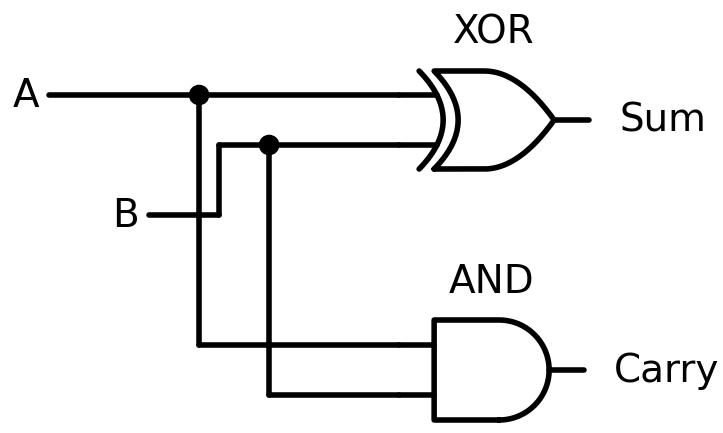
We can verify this in R, since R’s &, |, !, and xor() are the same Boolean operations:
half_adder <- function(A, B) {
  list(Sum = xor(A, B), Carry = A & B)
}

half_adder(FALSE, FALSE)
#> $Sum
#> [1] FALSE
#>
#> $Carry
#> [1] FALSE
half_adder(TRUE, FALSE)
#> $Sum
#> [1] TRUE
#>
#> $Carry
#> [1] FALSE
half_adder(TRUE, TRUE)
#> $Sum
#> [1] FALSE
#>
#> $Carry
#> [1] TRUE
TRUE + TRUE gives Sum = FALSE (0), Carry = TRUE (1). That’s binary 10: the number 2. But real addition involves three inputs, not two.
NoteFrom half adder to full adder
When you add column by column in decimal, you carry from the previous column. Binary works the same way: each column receives A, B, and a carry-in (Cin) from the column to the right.
Step 1: truth table. Three inputs, eight rows.
A  B  Cin | Sum  Cout
0  0   0  |  0    0
0  0   1  |  1    0
0  1   0  |  1    0
0  1   1  |  0    1
1  0   0  |  1    0
1  0   1  |  0    1
1  1   0  |  0    1
1  1   1  |  1    1
Step 2: sum of minterms. Read off rows where each output is 1:
Sum  = (NOT A AND NOT B AND Cin) OR (NOT A AND B AND NOT Cin)
       OR (A AND NOT B AND NOT Cin) OR (A AND B AND Cin)

Cout = (NOT A AND B AND Cin) OR (A AND NOT B AND Cin)
       OR (A AND B AND NOT Cin) OR (A AND B AND Cin)
Four terms per output, each with three variables. A mess.
Step 3: minimize with a Karnaugh map. A Karnaugh map (K-map) is a visual tool for simplifying Boolean expressions. You arrange the truth table rows in a grid so that adjacent cells differ by exactly one input, then look for rectangular groups of 1s: each group of 2, 4, or 8 adjacent 1s can be collapsed into a simpler term.
K-map for Cout, with AB on one axis and Cin on the other:
            AB
Cin    00   01   11   10
  0  |  0    0    1    0
  1  |  0    1    1    1
Three groups of two 1s emerge: the column AB=11 (group: A AND B, regardless of Cin), the row Cin=1 with B=1 (group: B AND Cin), and the row Cin=1 with A=1 (group: A AND Cin). The minimal expression:
Cout = (A AND B) OR (B AND Cin) OR (A AND Cin)Much simpler than the four-term canonical form. For Sum, the K-map shows no adjacent groups (the 1s form a checkerboard), so there’s no simplification beyond XOR:
Sum = A XOR B XOR CinStep 4: build the circuit. The Sum formula chains two XOR gates. The Cout formula uses two AND gates and one OR gate, but engineers noticed that (B AND Cin) OR (A AND Cin) can be rewritten as ((A XOR B) AND Cin), because the XOR captures whether exactly one of A, B is 1. The final circuit uses five gates: two XOR, two AND, one OR.
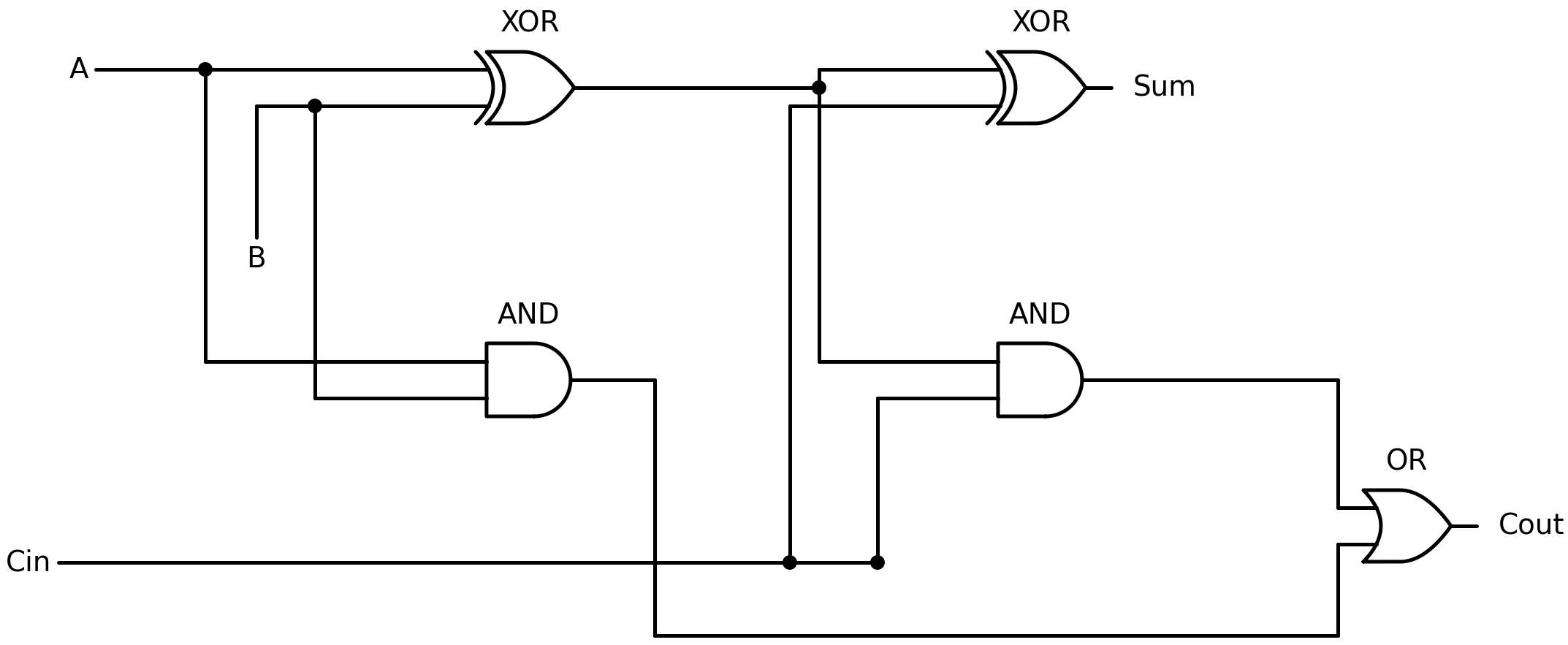
full_adder <- function(A, B, Cin) {
  p <- xor(A, B)              # partial sum (first XOR)
  Sum  <- xor(p, Cin)         # final sum (second XOR)
  Cout <- (A & B) | (p & Cin) # carry-out
  list(Sum = Sum, Carry = Cout)
}

full_adder(TRUE, TRUE, FALSE)  # 1+1+0 = 10 binary
#> $Sum
#> [1] FALSE
#>
#> $Carry
#> [1] TRUE
full_adder(TRUE, TRUE, TRUE)   # 1+1+1 = 11 binary
#> $Sum
#> [1] TRUE
#>
#> $Carry
#> [1] TRUE
1 + 1 + 0 = 2 (binary 10: Sum=0, Carry=1). 1 + 1 + 1 = 3 (binary 11: Sum=1, Carry=1).
Chain four full adders together, each one’s Cout feeding the next one’s Cin, and you have a 4-bit adder. Chain 32 of them and you can add two R integers, because an integer is stored as 32 of these bits. The integer 42 is 101010:
  1   0   1   0   1   0
 2⁵  2⁴  2³  2²  2¹  2⁰
 32  16   8   4   2   1

 32 + 0 + 8 + 0 + 2 + 0 = 42
Each position represents a power of 2: a 1 means “include this power,” a 0 means “skip it.” One of the 32 bits holds the sign, which leaves 31 for the magnitude and puts the largest integer at 231 - 1:
.Machine$integer.max
#> [1] 2147483647
A double uses 64 bits split into sign, exponent, and significand, the layout from Section 6.1, and adding two doubles takes a larger circuit that aligns the exponents before an adder like this one sums the significands. A CPU is billions of such gates arranged to perform arithmetic, comparisons, and memory access. The & you use to filter penguins (body_mass_g > 4000 & species == "Gentoo") runs on these same gates.
The workflow we followed (truth table, canonical form, minimize, circuit) is called Boolean function minimization. K-maps work for up to four or five inputs; for larger circuits, algorithms like Quine-McCluskey or Espresso take over. The principle, though, is always the same: specify what you want as a truth table, then find the smallest set of gates that produces it.
A logic gate on its own computes one result and stops. Add a clock (an electrical signal that alternates between 0 and 1 at a fixed rate, say three billion times per second) and flip-flops (gates that remember their output until the next clock tick), and the circuit can feed its result back into itself as the next input. Mr. State from Section 1.1, holding the running total of 3 + 5 + 2 + 8, is an adder circuit driven by a clock, reading one number per tick and feeding the output back into the input. Every processor is this idea, scaled up.
Every operator in this section takes logical vectors in and hands a logical vector back. At some point the code has to stop combining tests and act on one.
Exercises
- What does
c(TRUE, FALSE, TRUE) & c(TRUE, TRUE, FALSE)return? - What does
TRUE | stop("error")do? What aboutTRUE || stop("error")? Explain the difference. - Write a logical expression that tests whether
xis between 10 and 20 (inclusive).
8.4 if/else as an expression
Assign an if to a name and see what lands there:
x <- -3
y <- if (x > 0) "positive" else "non-positive"
y
#> [1] "non-positive"
if (x > 0) "positive" else "non-positive" evaluated to "non-positive", and that value was assigned to y. This follows from Section 3.4: everything in R is an expression, and expressions return values. if/else is an expression like any other, which is worth pausing on if you come from a language where if only steers which lines run and never produces a value of its own.
Multi-line branches use curly braces, and the value of each branch is the last expression evaluated inside it:
classify <- function(x) {
  if (x > 0) {
    label <- "positive"
    label
  } else if (x == 0) {
    "zero"
  } else {
    "negative"
  }
}

classify(5)
#> [1] "positive"
classify(0)
#> [1] "zero"
classify(-2)
#> [1] "negative"
Conditions chain with else if, which is an else followed by another if. Long chains get hard to read, and past two or three branches switch() or dplyr::case_when(), both later in this chapter, usually read better.
NoteThe lambda calculus connection
In Section 5.7 you met Church’s encoding of booleans, where TRUE = λx. λy. x picks the first of two arguments and FALSE = λx. λy. y picks the second. R’s if/else has the same shape: it takes a condition and two branches, and returns whichever branch the condition selects.
if (c(TRUE, FALSE)) "yes"
#> Error in `if (c(TRUE, FALSE)) ...`:
#> ! the condition has length > 1
if expects a single logical value and refuses a longer vector. But data analysis rarely involves a single value; you usually need to test every element of a column at once. So what do you reach for when if/else won’t scale?
Exercises
- What does
if (TRUE) 1 else 2return? What aboutif (FALSE) 1 else 2? - Write a function
sign_labelthat takes a number and returns"positive","zero", or"negative". - What does
if (NA) "yes" else "no"produce? Why?
8.5 Vectorized conditionals
if/else works on a single value. ifelse() works on vectors:
x <- c(-2, 0, 3, -1, 5)
ifelse(x > 0, "pos", "neg")
#> [1] "neg" "neg" "pos" "neg" "pos"
For each element, ifelse() checks the condition and returns the corresponding value from the second or third argument, vectorized in the same way + and > are (Section 4.4).
Give the two branches different types and watch what comes back:
ifelse(TRUE, 1, "no")
#> [1] 1
ifelse(FALSE, 1, "no")
#> [1] "no"
One call returns a number, the other a string. The return type depends on which branch is taken, so it can change when your data changes, with no message. dplyr::if_else() checks:
dplyr::if_else(TRUE, 1, "no")
#> Error in `dplyr::if_else()`:
#> ! Can't combine `true` <double> and `false` <character>.
It refuses to mix types, so the mismatch surfaces where it happens.
For multiple conditions, dplyr::case_when() replaces nested ifelse() chains:
x <- c(-2, 0, 3, -1, 5)
dplyr::case_when(
  x > 0  ~ "positive",
  x == 0 ~ "zero",
  x < 0  ~ "negative"
)
#> [1] "negative" "zero"     "positive" "negative" "positive"
Each line is a condition-value pair, evaluated in order; case_when() returns the value for the first condition that matches. Compare this to the nested version:
ifelse(x > 0, "positive", ifelse(x == 0, "zero", "negative"))Both produce the same result. The nested version has to be read from the inside out, and every added condition adds a level.
TipOpinion
Prefer dplyr::case_when() over nested ifelse(). Nesting ifelse() calls creates code that is hard to read and easy to break when you add a condition; case_when() scales cleanly to any number of branches.
Exercises
- Use
ifelse()to replace negative values inc(-3, 5, -1, 8, 0)with zero. - Use
dplyr::case_when()to classifypenguins$body_mass_ginto"light"(under 3500),"medium"(3500-5000), and"heavy"(over 5000). Don’t forgetNAs. - What happens if no condition matches in
case_when()? Test it.
8.6 switch()
When you need to dispatch on a single string value, switch() is cleaner than a chain of if/else if:
describe <- function(day) {
  switch(day,
    Monday    = "start of the week",
    Friday    = "almost there",
    Saturday  = ,
    Sunday    = "weekend",
    "just another day"
  )
}

describe("Friday")
#> [1] "almost there"
describe("Saturday")
#> [1] "weekend"
describe("Wednesday")
#> [1] "just another day"
Each name is matched against the input. Saturday = with no value falls through to the next case (Sunday), so both return "weekend". The unnamed last entry is the default.
switch() only works with a single string (or number, but string dispatch is the common use). For vector operations, use case_when(). For complex branching logic, use if/else if. switch() fills the narrow gap where you have one value and several named options, and it fills it well.
Every comparison and every & in this chapter runs in a fixed handful of gate operations, and a filter over a million rows runs a million of them. Whether that takes a second or an hour depends on something this chapter has not touched: how the amount of work grows as the data grows.