
Check occurrence records, at any scale
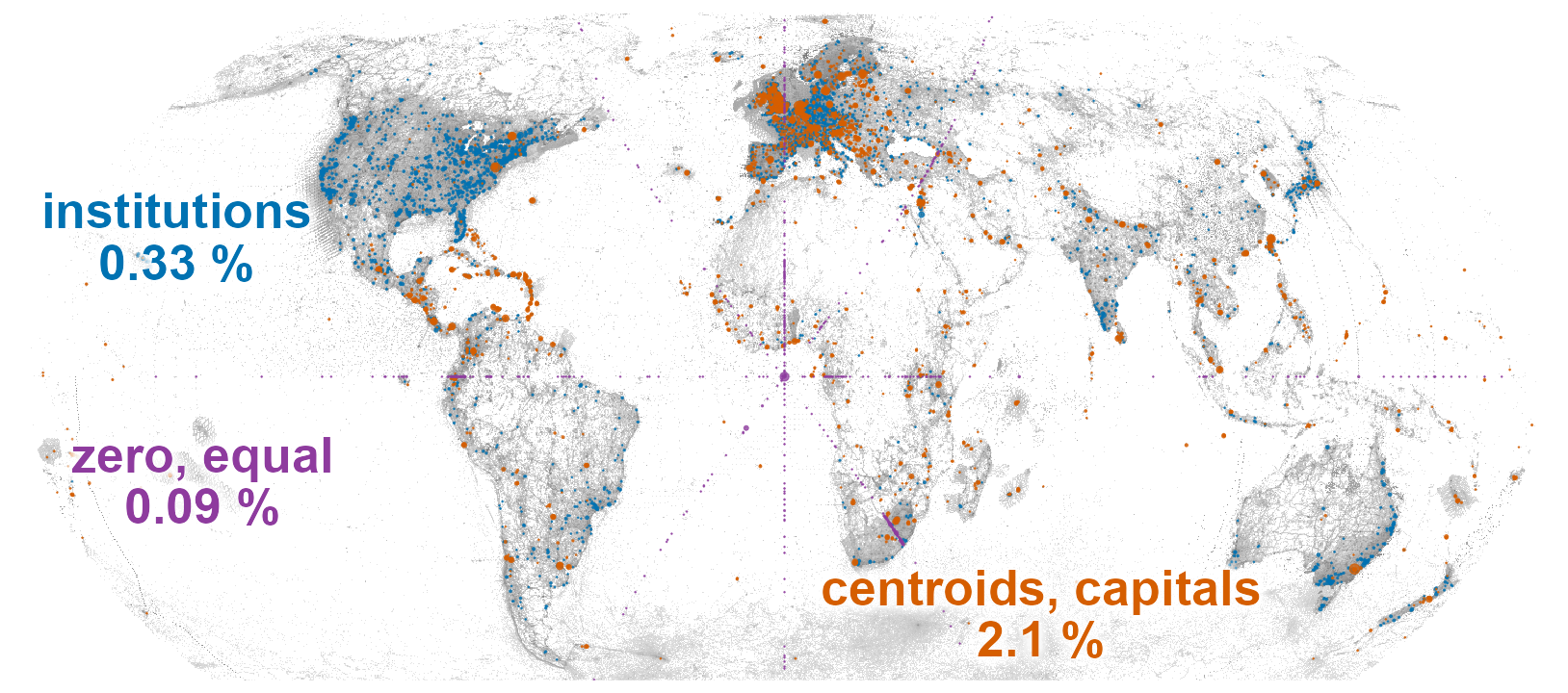
OccurrenceCleaner checks species occurrence records for potential problems, such as coordinates at country centroids or museums, in the sea, or far from other records of the same species.
The package is an extension of CoordinateCleaner (Zizka et al. 2019) tailored to large-scale occurrence data. CoordinateCleaner, by Alexander Zizka and co-authors, defines these tests, their default buffers and the options of the outlier and dataset tests, and runs them on a data frame in memory. OccurrenceCleaner runs the same tests as nearest-neighbour queries in C++ and streams tables from disk, so they can be applied to a full snapshot of the Global Biodiversity Information Facility (GBIF). It also adds tests of its own and expands the reference data.
Each test stores its result as a flag alongside the record. All records remain available, so you can inspect their flags, compare how different combinations of tests affect the dataset, and choose which records to exclude. OccurrenceCleaner supports:
- Large tables. Checking ten million records for proximity to capital cities takes 1.4 seconds (timings). Chunked processing keeps memory use bounded, allowing billions of species records occupying hundreds of gigabytes to be cleaned on a desktop computer in a single R session. Interrupted runs can resume from saved progress.
-
Comparing cleaning rules. Compute flags once, then choose which tests exclude records.
tally_flags()counts exclusions by rule and by taxon, period or precision class for reporting in a methods section or data paper. - More institution locations. OccurrenceCleaner checks records against 23,895 locations of museums, herbaria, botanic gardens and other institutions to flag coordinates that may refer to the collection’s address. The reference table includes 7,665 additional locations from Wikidata and Wikipedia’s natural history museum lists. All locations are checked by default. You can also restrict the test to CoordinateCleaner’s sources.
- Checks based on GBIF metadata. Tests check GBIF’s reported issues, the type of record, and whether the organism is recorded as native or introduced. Habitat information for the recorded genus helps distinguish marine from terrestrial taxa.
The tests follow CoordinateCleaner’s definitions and default buffers, with documented differences in Compatibility with CoordinateCleaner. Automated checks run both packages on sampled records and require matching flags for the shared behaviour. A methods section can cite CoordinateCleaner for the original tests and describe the tests and settings used in OccurrenceCleaner.
Installation
The package compiles C++ code. Install the build tools for your operating system first:
| Operating system | Build tools |
|---|---|
| Windows | Rtools |
| macOS | Run xcode-select --install in Terminal |
| Debian / Ubuntu | Install r-base-dev
|
Check that R can find the compiler:
pkgbuild::has_build_tools(debug = TRUE)Then install OccurrenceCleaner:
# install.packages("pak")
pak::pak("gcol33/OccurrenceCleaner")
Optional: multithreading
OpenMP lets the package use several CPU threads through the n_threads argument of flag_occurrences().
Rtools on Windows and the default compiler on Linux include OpenMP. Without it, the package installs and runs every test on one thread.
macOS setup
Apple’s compiler needs an additional OpenMP runtime. Install it in Terminal:
Before installing OccurrenceCleaner, add the settings for your Mac to ~/.R/Makevars, R’s personal compiler-settings file. Create the directory and file if needed.
Apple Silicon:
CPPFLAGS += -I/opt/homebrew/opt/libomp/include -Xclang -fopenmp
LDFLAGS += -L/opt/homebrew/opt/libomp/lib -lomp
Intel:
Usage
- Flag the records with
flag_occurrences(). By default it runs every test the columns allow. - Choose a cleaning rule, the set of tests used for filtering, and keep the records it does not flag with
keep_unflagged(). - Compare rules per species, period or dataset with
tally_flags().
test_plan() shows which tests run on a table and why each other test does not. flag_tests() lists every test with its definition and the columns it needs.
The input is a data frame, or a path to a table on disk (Processing large datasets on disk). Coordinates are longitude and latitude in decimal degrees (WGS84). Columns are matched by their Darwin Core names, the standard field names for biodiversity data, regardless of capitalisation. Other column names are mapped with occ_columns().
Each test reads a few columns, and by default every test whose columns are present runs. To run only some tests, name them in tests. If a named test lacks one of its columns, the call stops and reports which column is missing.
library(OccurrenceCleaner)

x <- data.frame(
  species = c("Quercus robur", "Quercus robur",
              "Fagus sylvatica", "Fagus sylvatica"),
  decimalLongitude = c(12.58, 0, 16.37, 14.05),
  decimalLatitude = c(55.67, 0, 48.21, 47.85)
)
f <- flag_occurrences(x)
f[, c("species", "flag_zero", "flag_capital",
      "flag_gbif_headquarters", "flag_sea")]
#>           species flag_zero flag_capital flag_gbif_headquarters flag_sea
#> 1   Quercus robur     FALSE         TRUE                   TRUE    FALSE
#> 2   Quercus robur      TRUE        FALSE                  FALSE     TRUE
#> 3 Fagus sylvatica     FALSE         TRUE                  FALSE    FALSE
#> 4 Fagus sylvatica     FALSE        FALSE                  FALSE    FALSE
A flag is TRUE when the record fails the test. The first record lies within 1 km of the GBIF headquarters in Copenhagen and within 10 km of the capital, the second is a zero coordinate at sea, the third is in Vienna, and the fourth, in rural Upper Austria, passes every test. The integer flags column encodes every test of a record, one bit per test.
Running a test only adds its flag, so the default runs every test the data allows. Which records to exclude is a separate choice, made afterwards with a cleaning rule. A rule specifies which tests to use when filtering: a record is excluded if any test in the rule flags it.
A flagged record may still be valid: a real observation can lie within 10 km of a capital, so you choose the tests that suit your analysis. A rule for species distribution modelling might exclude fossil and living specimens along with coordinate problems, and another study can choose a different set. You can compare several rules on the same flags, then select the records to keep:
strict <- c("zero", "equal", "capital", "centroid", "institution",
            "gbif_headquarters", "sea")
mild   <- c("zero", "equal", "gbif_headquarters")

has_flag(f, strict)
#> [1]  TRUE  TRUE  TRUE FALSE
tally_flags(f, by = "species", rules = list(strict = strict, mild = mild))
#> <occ_tally> 4 records in 2 groups of species, rules: strict, mild
#>          species n removed_strict kept_strict removed_mild kept_mild
#>  Fagus sylvatica 2              1           1            0         2
#>    Quercus robur 2              2           0            2         0
#> # summary() for the share each test flags

kept <- keep_unflagged(f, mild)
kept[, c("species", "decimalLongitude", "decimalLatitude")]
#>           species decimalLongitude decimalLatitude
#> 3 Fagus sylvatica            16.37           48.21
#> 4 Fagus sylvatica            14.05           47.85
Choosing a cleaning rule compares rules on a larger table, with year and coordinate uncertainty cut into bins at tally time.
The tests
The package has 30 tests. Twenty carry CoordinateCleaner’s definitions and defaults, from zero coordinates and capital buffers to species outliers, gridded datasets and fossil ages. The other ten are additions that read GBIF’s issue warnings, basis of record and establishment means, and set the land test against the habitat of the record’s genus. The tests in detail gives each test’s definition, default and source, and flag_tests() returns the same table in R.
The reference data (the point lists of capitals, country centroids and institutions, and the land polygons) is rebuilt from public sources. Each layer is pinned by version and checksum and recorded with the flags, so a cleaning can be repeated later. Reference data lists each layer with its source and version; reference = "CoordinateCleaner" uses that package’s own tables instead, and the gazetteers argument replaces a test’s points or polygons with the user’s own.
Using OccurrenceCleaner in an analysis
- The input is any table with Darwin Core coordinate and species columns, such as a GBIF download from rgbif, a fossil table from the Paleobiology Database via paleobioDB, or another aggregator’s export.
- Taxonomic names are matched beforehand, for example with taxify or taxize.
- The records are flagged with
flag_occurrences(), and a cleaning rule is chosen by comparing rules withtally_flags(). - The retained records go to species distribution models (dismo, sdm), biogeography on phylogenies (phytools), IUCN Red List assessments (red) or, for fossils, PyRate through
export_pyrate().
Outliers and dataset tests
The outlier and dataset tests judge a record against the rest of its species or dataset, so they run in a pass over the whole input before the record tests, streamed input included. Their options go in settings, with CoordinateCleaner’s defaults:
tests <- c("invalid", "outlier", "dataset_ddmm", "dataset_rounded")
mad <- list(outlier = list(method = "mad"))
flag_occurrences(occ, tests = tests, settings = mad)
Outliers and dataset tests shows each method on simulated records.
Fossil records
A table from the Paleobiology Database goes through flag_occurrences() too, with the age test and the fossil outlier tests of CoordinateCleaner’s clean_fossils(). Its column names are given once through occ_columns():
tests <- c("invalid", "zero", "centroid", "institution",
           "age_equal", "age_range_outlier", "spatiotemporal_outlier")
pbdb_cols <- occ_columns(lon = "lng", lat = "lat", species = "accepted_name")
flag_occurrences(pbdb, tests = tests, columns = pbdb_cols)
Cleaning fossil records goes from a PBDB download to PyRate input files.
Processing large datasets on disk
flag_occurrences() uses vectra to process tables stored on disk, including GBIF snapshots. It accepts a directory of Parquet files, a .vtr file, a delimited text file or a vectra query node.
The function flags and writes each input file separately. If processing is interrupted, rerunning the call skips completed files. The keep argument specifies which input columns to save alongside the flags for grouping:
keep <- c("kingdom", "year", "coordinateuncertaintyinmeters")
f <- flag_occurrences("gbif_snapshot/occurrence.parquet",
                      out = "flags", keep = keep)

coordinatecleaner <- c("invalid", "zero", "equal", "capital", "centroid",
                       "institution", "gbif_headquarters", "sea")
tally_flags(f, by = "kingdom", bins = list(year = c(1950, 1970, 1990, 2000)),
            rules = list(coordinatecleaner = coordinatecleaner))
See Large tables on disk for details on output files, memory use and resuming interrupted runs.
Documentation
Start with Get started: one path from a data frame to the records that pass a cleaning rule.
- Cleaning GBIF data: a GBIF download flagged, compared under several rules and filtered.
- Choosing a cleaning rule: what each rule removes, per group.
- Large tables on disk: streaming a snapshot.
- Cleaning fossil records: PBDB tables and PyRate export.
- The tests in detail: what each test checks, its default and source.
- Outliers and dataset tests: the tests that judge a record against its group.
- Reference data: where each layer of reference data comes from and how it differs from CoordinateCleaner’s.
- Custom reference points and polygons: the user’s own points, polygons and species ranges in place of the shipped reference data.
- Compatibility with CoordinateCleaner: function and argument mapping, every documented difference, timings.
- Full reference: every function, grouped by job.
Getting help
Questions and bug reports go to the GitHub issues. A bug report is easiest to act on with a small reproducible example, for instance made with reprex.
Contributing
Pull requests are welcome; see the contributing guide.
Support
“Software is like sex: it’s better when it’s free.” — Linus Torvalds
I’m a PhD student who builds R packages in my free time because I believe good tools should be free and open. I started these projects for my own work and figured others might find them useful too.
If this package saved you some time, buying me a coffee is a nice way to say thanks. It helps with my coffee addiction.

Acknowledgements
The tests, their default buffers and the options of the outlier and dataset tests come from CoordinateCleaner by Alexander Zizka and co-authors (Zizka et al. 2019), an rOpenSci package. Its documented definitions are what the equivalence tests check against, and the reference data here is rebuilt from the public sources it draws on.
License
OccurrenceCleaner is licensed under MIT. Two external resources have separate licences:
-
CoordinateCleaner (GPL-3) is an optional dependency for equivalence tests and
reference = "CoordinateCleaner". Its code and data are not bundled. - Country centroids from the World Borders Dataset (Bjorn Sandvik, thematicmapping.org) are licensed under CC BY-SA.
Citation
If you use OccurrenceCleaner, please cite the package and CoordinateCleaner (Zizka et al. 2019, doi:10.1111/2041-210X.13152), which provides the test definitions and default buffers.
Colling G (2026). _OccurrenceCleaner: Fast Quality Checks for Species
Occurrence Records_. R package version 0.2.0,
<https://gillescolling.com/OccurrenceCleaner/>.
BibTeX: